.%20Same%20paths%20and%20fill;%20only%20the%20viewBox%20is%20cropped%20to%20the%20file's%20own%20clip%20rect%20so%20the%20bar%20sets%20the%20clear%20space.%20--%3e%3csvg%20width='480.615'%20height='97.3693'%20viewBox='97%2078%20480.615%2097.3693'%20fill='none'%20xmlns='http://www.w3.org/2000/svg'%3e%3cg%20clip-path='url(%23clip0_1709_25672)'%3e%3cpath%20d='M507.64%20157.772C497.197%20157.772%20490.907%20152.963%20490.907%20141.818V78H503.605V97.3565H530.187L547.394%20137.712L562.584%2097.3565H577.062L544.784%20175.369H530.424L540.63%20151.907L521.406%20108.501H503.605V139.941C503.605%20144.751%20505.741%20146.628%20510.725%20146.628H522.236V157.772H507.64Z'%20fill='%23121516'/%3e%3cpath%20d='M467.845%20157.772V97.3565H480.543V157.772H467.845ZM467.489%2091.139V78H480.899V91.139H467.489Z'%20fill='%23121516'/%3e%3cpath%20d='M404.356%20157.772L425.005%20126.215L405.899%2097.3566H421.089L433.549%20118.004L446.128%2097.3566H461.318L442.212%20126.215L462.861%20157.772H447.671L433.549%20134.779L419.546%20157.772H404.356Z'%20fill='%23121516'/%3e%3cpath%20d='M377.834%20159.532C359.915%20159.532%20348.285%20146.745%20348.285%20127.271C348.285%20108.501%20360.034%2095.5968%20377.122%2095.5968C394.329%2095.5968%20405.84%20107.445%20405.84%20125.16C405.84%20127.858%20405.722%20129.852%20405.366%20131.494H361.458C362.17%20142.874%20367.747%20148.974%20377.953%20148.974C385.31%20148.974%20390.176%20145.689%20391.956%20139.237H404.891C402.043%20151.907%20391.837%20159.532%20377.834%20159.532ZM361.458%20121.64H392.905C392.193%20111.317%20386.853%20106.155%20377.122%20106.155C367.984%20106.155%20362.288%20111.903%20361.458%20121.64Z'%20fill='%23121516'/%3e%3cpath%20d='M328.431%20157.772V78H341.128V157.772H328.431Z'%20fill='%23121516'/%3e%3cpath%20d='M263.88%20175.369V97.3565H276.578V103.457C280.375%2098.4123%20287.021%2095.5968%20294.853%2095.5968C311.111%2095.5968%20321.316%20107.915%20321.316%20127.506C321.316%20147.097%20311.111%20159.532%20294.853%20159.532C287.021%20159.532%20280.375%20156.717%20276.578%20151.672V175.369H263.88ZM292.123%20148.035C302.685%20148.035%20308.263%20140.997%20308.263%20127.506C308.263%20114.132%20302.685%20107.093%20292.123%20107.093C281.443%20107.093%20275.866%20114.132%20275.866%20127.506C275.866%20140.997%20281.443%20148.035%20292.123%20148.035Z'%20fill='%23121516'/%3e%3cpath%20d='M224.479%20157.772V97.3566H237.176V103.809C239.55%2099.7028%20244.178%2097.3566%20249.874%2097.3566H258.181V109.322H249.874C241.092%20109.322%20237.176%20113.546%20237.176%20122.931V157.772H224.479Z'%20fill='%23121516'/%3e%3cpath%20d='M188.82%20159.532C170.9%20159.532%20159.271%20146.745%20159.271%20127.271C159.271%20108.501%20171.019%2095.5968%20188.107%2095.5968C205.315%2095.5968%20216.825%20107.445%20216.825%20125.16C216.825%20127.858%20216.706%20129.852%20216.35%20131.494H172.443C173.155%20142.874%20178.733%20148.974%20188.938%20148.974C196.296%20148.974%20201.161%20145.689%20202.941%20139.237H215.876C213.028%20151.907%20202.823%20159.532%20188.82%20159.532ZM172.443%20121.64H203.891C203.179%20111.317%20197.838%20106.155%20188.107%20106.155C178.97%20106.155%20173.274%20111.903%20172.443%20121.64Z'%20fill='%23121516'/%3e%3cpath%20d='M97%20175.369V97.3565H109.698V103.457C113.495%2098.4123%20120.141%2095.5968%20127.973%2095.5968C144.231%2095.5968%20154.436%20107.915%20154.436%20127.506C154.436%20147.097%20144.231%20159.532%20127.973%20159.532C120.141%20159.532%20113.495%20156.717%20109.698%20151.672V175.369H97ZM125.244%20148.035C135.805%20148.035%20141.383%20140.997%20141.383%20127.506C141.383%20114.132%20135.805%20107.093%20125.244%20107.093C114.563%20107.093%20108.986%20114.132%20108.986%20127.506C108.986%20140.997%20114.563%20148.035%20125.244%20148.035Z'%20fill='%23121516'/%3e%3c/g%3e%3cdefs%3e%3cclipPath%20id='clip0_1709_25672'%3e%3crect%20width='480.615'%20height='97.3693'%20fill='white'%20transform='translate(97%2078)'/%3e%3c/clipPath%3e%3c/defs%3e%3c/svg%3e)
AI Agent vs MCP? When To Use Each (& When You Need Both)
AI agents decide what actions to take to reach a goal, while MCP is the open standard that connects them to external tools and data, and complex tasks often need both.
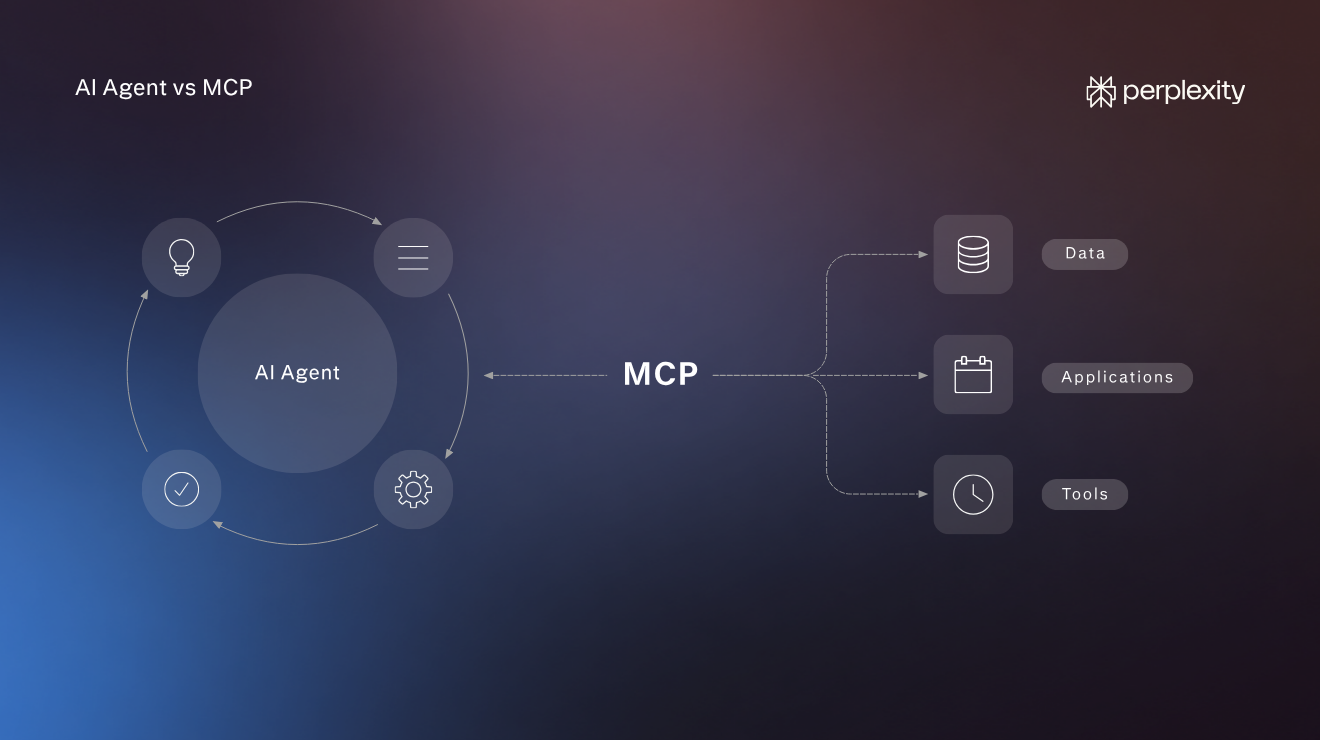
An AI agent is software that decides its own actions and tool calls to achieve a specific goal, and the Model Context Protocol (MCP) is an open standard for how AI applications connect to external tools and data. So MCP lets AI agents interact with apps and query databases to complete tasks.
The article explains what agents and MCPs are, how they're different, and how they work. You will also learn when to use each one and when to use agents and MCPs together.
How is an AI agent different from an MCP? Key differences.
An AI agent is the independent actor that decides what to do to solve a problem, and an MCP is the connection AI tools use to access data and perform tasks with other apps.
Dimension | AI agent | MCP |
What it is | Software that achieves a goal using a large language model (LLM), tools, and works in a loop | An open protocol for connecting AI applications to tools and data |
Role | The actor that decides the next action and executes the next step | The connection that exposes tools, resources, and prompts |
Does it decide? | Yes, within the permissions it holds | No; it carries requests and results |
Where it runs | Inside the AI application | As a client-to-server connection to a separate tool server |
What is an AI agent and how does it work?
An AI agent is a software system that independently chooses the best course of action to complete a task.
For example, when used for research, the AI agent analyzes the research question, breaks it down into sub-questions, delegates each to a sub-agent that looks for relevant information across different sources, and "reports" back.
The main agent analyzes findings, adjusts the research strategy, dispatches more agents to fill gaps, and collates the output into a report. Over time, it also learns how to carry out the subtasks most efficiently.
The AI agent relies on three components:
- Reasoning core: The LLM that interprets inputs, plans, and decides what to do
- Tool integrations: Connections to external systems. For example, databases or APIs that let it access information and perform actions.
- Memory: Short-term session context and long-term stored knowledge used across sections
The agents operate within preset guardrails (for example, don't use sources older than 3 years or secondary stat roundups), but they decide how to complete the task.
This autonomy to choose how to accomplish a goal distinguishes AI agents from AI workflows. The latter follow a predefined, deterministic path, which is perfect for structured, repetitive tasks that don't require reasoning and decision-making.
What is an MCP and how does it work?
MCP stands for Model Context Protocol, and it's a secure, standardized way for AI applications like Perplexity to connect to external tools and data sources.
For instance, my personal AI assistant uses MCP to connect to Notion, where I store all client project information, my Google Calendar, and Clockify, which I use for time tracking.
Thanks to this, it knows what work I need to do in a particular month and how long similar tasks took in the past, so it can block enough time in my calendar and assess my availability for additional work.
MCP is a shared protocol, so any AI tool can access any app as long as both support MCP without a developer coding a bespoke connection, as is the case with a REST API.
On a technical level, MCP consists of three elements:
- MCP Host: The AI application that coordinates and manages clients (e.g., Perplexity)
- MCP Client: A "broker" inside the host that supports a connection to the MCP server and passes information to the MCP host
- MCP Server: The front to a resource like a database or a SaaS app that gives the MCP client access to its capabilities (Notion, Google Calendar, Clockify, etc.).
When to use an agent, MCP, or both. And when neither.
The choice between an AI agent and an MCP boils down to one question: Do you need help completing a complex task or want to connect an AI tool to external resources?
However, not all tasks need agentic AI, and those that do often need an MCP, too.
Here’s a more nuanced breakdown of when to use each, when to use them together, and when to use other options:
- Use an AI agent to complete complex tasks where you can't predict the exact steps and each step requires judgment and decision-making.
- Use a workflow with direct tool calls to complete routine tasks with fixed steps.
- As a developer, use MCP when you want your app to be compatible with existing and future AI tools.
- As an end-user, use MCP to increase your AI assistant's capabilities by connecting it to other apps and resources.
- Use AI agents and MCP together when you want to solve complex, unique tasks that require autonomy and access to third-party tools and data sources.
Situation | Best fit |
Open-ended, multi-step goal | Agent |
Fixed, predictable steps | Predefined workflow with direct tool calls (via API) |
You want many AI applications to connect to your app or resource | MCP |
You want to give your AI assistant access to other tools or resources | MCP |
A complex multi-step task that requires access to several external systems | Agent plus MCP |
How do AI agents and MCP work together?
The AI agent decides what to do, and MCP carries each request to the apps involved.
Imagine you're the owner of a small online shop, and you want to find out why your sales dropped last month, so you ask your AI assistant to investigate. The AI assistant deploys an agent that uses MCP to get the required information:
- Agent: The assistant decides to compare last month's sales with the month before.
- MCP: It asks the ecommerce platform for sales by product for both months.
- Agent: It sees that one product accounts for most of the drop, so it decides to check the product's stock and ads.
- MCP: It asks the shop platform for the product's stock levels and the ad platform for its ad performance.
- Agent: Stock was normal, but the ads stopped running halfway through the month, so it decides to find out why.
- MCP: It asks the ad platform for the campaign's history and learns that the campaign reached its monthly budget limit.
- Agent: It reports the likely cause, suggests raising the limit or moving the budget, and leaves the decision to the owner.
As every step depends on the findings from the previous one, you can't predict them in advance. The agent analyzes the data obtained via MCP and uses it to plan subsequent actions.
Agent and MCP risks and guardrails
Connecting autonomous AI agents to other tools and apps via MCP exposes you to risks. Common concerns revolve around AI agents having more access than they need and third parties hijacking the MCP connection, for example, via indirect prompt injection or excessive agency.
In most instances, the solution is to manually control the information the agent can access, monitor its activity, and use only connectors from trusted sources.
Risk | How it works | Guardrail |
Indirect prompt injection | Hidden instructions in content the AI reads, for example, a web page, an email, or a file. It tells the AI to do something as if it came from its owner. | Treat outside content as untrusted, and approve high-impact actions manually. |
Tool poisoning (and "rug pulls") | Hidden instructions inside a connector's own description, which the AI can read but the person cannot see. In a "rug pull," a connector changes its description after you approve it. | Use only personally approved connectors and recheck them afterwards. |
Excessive agency | The AI has more access than the task needs. | Give each connection only the access the task needs. |
Fake connectors | Someone publishes a fake copy of the official MCP connector with malicious code. | Install connectors only from trusted sources. |
Use Perplexity agents and MCP
Perplexity uses agents and MCP in both directions. Its agents, like Computer, use MCP to connect to outside apps, and other AI assistants can connect to Perplexity through MCP to power their research.
Perplexity Computer is a general-purpose AI agent that uses MCP to connect with third-party services. It can search and browse the web, write and run code, create documents, read and send email, manage tasks in tools such as Jira, Slack, or Notion, and more.
The connection also runs the other way. An AI assistant that supports MCP, like Claude, ChatGPT, or Cursor, can use Perplexity's MCP server to run a web search and get back results with titles, URLs, and snippets, or assign Computer a multi-step task to complete.
FAQs
Are AI agents and MCP the same?
No, AI agents and MCP aren't the same, and each solves different problems. AI agents are software tools that autonomously complete users' tasks, while MCP is a standardized way for AI tools to access other apps.
AI agents and MCP often work together. An AI agent may use MCP to access data from another software application to realize the assigned objective.
What is the difference between MCP and agent skills?
MCP (Model Context Protocol) connects an AI tool to outside apps and data, while agent skills are reusable instructions, scripts, and resources that teach an AI agent how to do a specialized task and set the guardrails.
Is MCP the same as API?
No, MCP and API aren't the same. API lets one piece of software call another using rules a developer builds in advance, while MCP lets AI agents see what capabilities are available and decide which ones to call without a developer coding the connection ahead of time.
Having said that, MCP servers often use APIs to connect with tools.
How does MCP differ from A2A?
MCP (Model Context Protocol) connects an AI agent to tools and data, while A2A (Agent2Agent) connects AI agents. A team can use both, with MCP handling tool integration and A2A handling collaboration between agents.
How does MCP differ from RAG?
RAG (retrieval-augmented generation) is a system that AI tools use to ground answers in reliable information from an outside knowledge source, while MCP is a standard for connecting AI applications to outside data and tools. So, a RAG can use MCP to access its knowledge base.
Can you use MCP without being a developer?
Yes, you can use MCP without writing any code by connecting an MCP-compatible AI tool to a service that already supports it. For example, Perplexity users can use MCP to connect to popular apps like Gmail, ClickUp, or Figma.