
Context rot in AI agents: why long tasks lose accuracy and how to prevent it
A guide to what builds up in an AI agent’s context, why it hurts accuracy, and how to set up tasks that stay reliable.
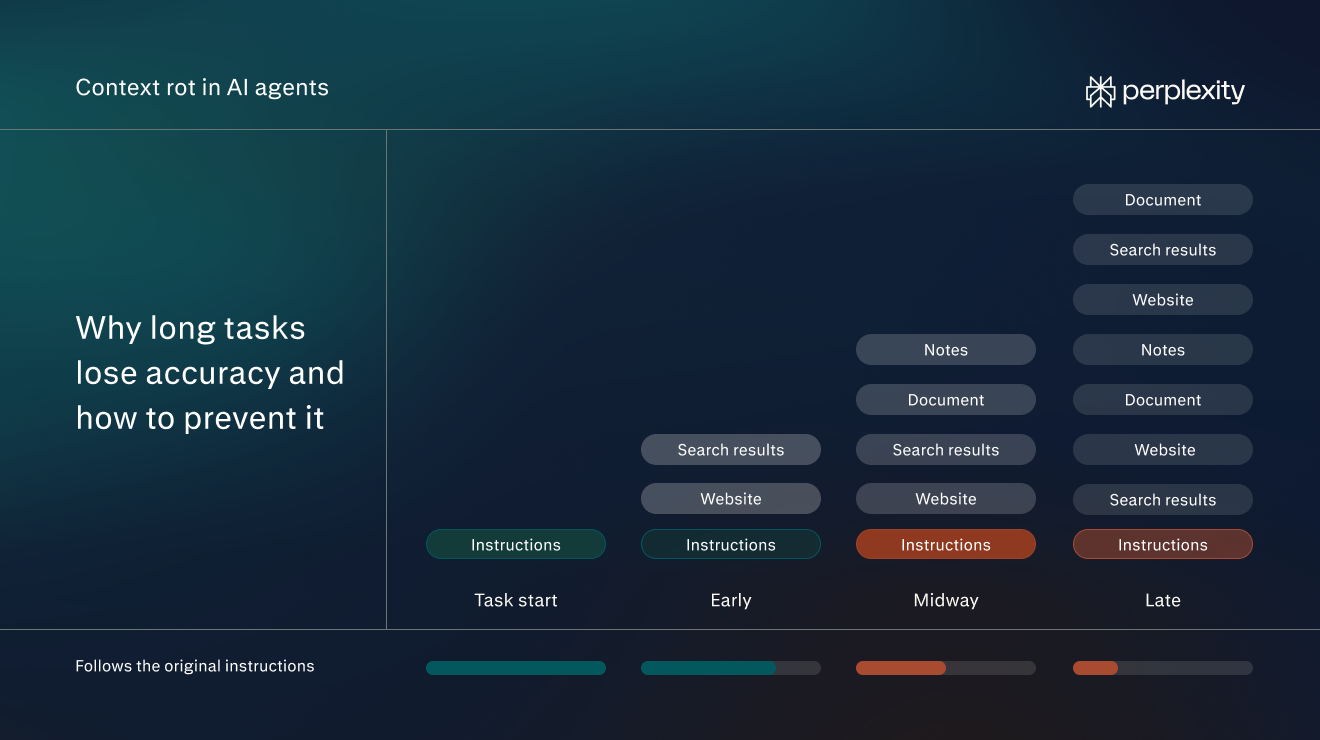
What context rot means for AI agents
Context rot in AI agents is the gradual loss of accuracy that sets in as an agent’s context fills up during a long task.
An agent’s context is the information the model has available for its next step. It can include instructions, earlier messages, search results, and text from websites or files. As the agent works, it may add more.
For example, say an agent’s task is to find suppliers that deliver within two weeks. At the start, its context holds only that request. Midway through the task, the context will also include the text of dozens of supplier websites, several pages of search results, and notes on which suppliers the agent has already checked.
There’s a limit to how much context a model can hold (called the context window). The window is measured in tokens, which are small chunks of text, usually a word or part of a word. Context rot increases as the context grows, which is why it’s most likely to occur in long tasks with many steps.
As context rot worsens, the agent will become less accurate. It might follow its original instructions less closely, overlook details, or mistake similar-looking information for what it needs.
For example, the agent might start including suppliers that take six weeks, even though it was told to find two-week delivery. The instruction is still in its context, but it no longer shapes the agent’s choices.
Context rot isn’t the same as simply running out of room in the context window. When a task's context grows past the window, material gets cut off or the task fails. Context rot starts well before that point, while everything still fits.
It’s also not the same thing as context poisoning (when misleading or harmful information gets into the agent’s context). An agent with accurate, complete information can still experience context rot.
Why context rot happens
Context rot happens because a model's attention is limited, even when its context window has room to spare. In AI models, attention is the technical term for how a model decides which parts of its input to draw on as it writes each word of a response. Every part of the context competes for that attention. The more text there is, the less attention each part gets.
For example, Chroma published a study of how input length affects AI models. It tested 18 models from Anthropic, OpenAI, Google, and Alibaba. In one test, the researchers hid a sentence about writing advice inside a long collection of essays. Then they asked the model what the advice was.
They ran the test many times, adding more essay text each time. The sentence and the question never changed. Only the amount of text around them did.
The more text the models had to read, the worse they did. This finding held across every test in the report. The researchers predict the drop in accuracy would be even bigger in real work that takes many steps, like most agent tasks.
How context rot can affect AI agents
Context rot will typically show up in one of four ways:
Losing track of the original instructions
Chroma's simplest test asked models to copy a long string of repeated words exactly, with one different word inserted somewhere in it. It was a trivial task with an explicit instruction. Even so, performance declined across all models as the text got longer. Some models began producing words that weren't in the input at all.
In an agent task, the user will typically set specific constraints at the start of a task, such as a budget or a required format. The agent might apply them less consistently as context grows. The cause is the overall length of the context, not where the instruction sits.
Missed details from the middle of a task
AI models use information most reliably when it sits at the very beginning or the very end of their input, according to a 2023 Stanford study. In one test, the researchers gave models a set of 20 documents and asked a question that only one of them answered. When that document came first or last, the models usually found the answer. When it sat in the middle of the set, they missed it far more often. Researchers call this a position effect.
The same pattern applies to agents. Information found earlier in a task may sit in the middle of a long conversation, where some models have more trouble using it. In the supplier example, the final list might leave out a good supplier the agent checked partway through the task.
Mixing up similar information
As context grows, agents may get worse at recognising which information fits their instructions. For example, say the user told the agent to find suppliers who ship "within two weeks". A supplier's website says "arrives within 14 calendar days of ordering". In a short task, an agent would likely spot that these mean the same thing. Buried among dozens of other supplier pages, it's more likely to miss the match.
Alternatively, the agent might start including results that aren’t relevant. Say the agent is looking for suppliers of office chairs. One supplier's website promises two-week delivery, but only for desks. Its chairs take six weeks. The website uses the same words as the instruction, so the agent may add the supplier to its list anyway. Researchers call information like this a distractor. It looks relevant but isn't, so it competes with the information that matters.
Chroma's study found that both problems got worse as the amount of surrounding text grew.
Errors that are hard to spot
Context rot doesn't trigger an error message. The agent keeps working and hands back output that looks finished. That makes its mistakes easy to miss.
In Chroma's tests, these mistakes took two forms. Sometimes a model gave a confident answer that was wrong. In the supplier research example, the agent might deliver a neat, well-formatted supplier list that includes a supplier whose delivery terms it misread.
Other times a model said it couldn't find information that was actually there. For example, the agent could deliver a report saying no suppliers meet the two-week limit when several do.
How to set up agent tasks to reduce context rot
Setting up tasks correctly will minimise the impact of context rot and keep the agent as accurate as possible over the course of the task. The following best practices can help.
Write the task as an assignment
A clear assignment keeps the context smaller. The agent knows when it's done, so it stops gathering material once it has enough. Specific requirements also give it something concrete to check each page against. That makes it easier for the agent to spot the right information.
Before sending a task, check that it covers three things:
- The task: what the agent should do and produce, such as "find suppliers and return a shortlist".
- The requirements: the facts the agent can’t guess, such as the budget, the deadline, the delivery address, and who the result is for.
- The output: the format, length, and structure, such as "a table with name, price per chair, and delivery time".
Put together, the supplier task query might look like this:
"Find 10 suppliers that can deliver 40 office chairs to our Chicago office within two weeks, for under $250 per chair. Return a table with supplier name, price per chair, delivery time, and a link to the product page. The list is for our office manager, who will place the order."
Keep each task focused
One task with one clear goal keeps the context small. Long tasks also cost more. Each step processes everything gathered so far, so a bloated context uses more credits at every step.
For a project with several parts, split it up:
- List the separate deliverables, for example a supplier search, a price comparison, and an email to the chosen supplier.
- Run each deliverable as its own task.
- Pass only the finished result from one task to the next. For example, upload the supplier table as a file to start the comparison task, rather than continuing in the thread that produced it.
The comparison task then starts with one table instead of every page.
Point the agent to the right sources
Every page the agent reads adds to its context, including the menus, ads, and boilerplate around the useful part. Giving the agent its sources directly cuts down on that noise.
Upload files the task depends on, such as the list of approved vendors, by attaching them to the query. Name the websites worth searching when the agent has to search the web, such as two trusted supplier directories.
Connect the tools where the information lives. For instance, in Perplexity Computer, open Connectors in the sidebar and enable the apps the task needs, such as Google Drive or Slack. Then mention them in the query: "Use the chair specs in our Google Drive." Only connect relevant apps, since each connector takes up some of the agent’s context.
If the information lives in an app that isn’t on the Connectors list, it may still be possible to connect it. Many apps offer an MCP (Model Context Protocol) connector, a standard way for AI tools to plug into other software. Computer can use these alongside its built-in connectors. In a company account, an admin may need to enable them first.
Ask for a final check against the instructions
End the query with a review step that names the constraints that matter most:
"Before finishing, check every supplier against these requirements: delivery within two weeks, under $250 per chair. Flag any that don't meet those requirements instead of leaving them out."
The constraints still sit at the start of the context. The review step gives the agent a reason to compare its final output against the constraints, instead of relying on the instructions to keep their influence across every step.
Meanwhile, asking it to flag problems, rather than simply dropping those results, makes mistakes easier to catch (such as rejecting a supplier that promises arrival within 14 calendar days because it does not use the words “two weeks”).
Review the work at checkpoints
For longer tasks, build a checkpoint into the query:
"Start by finding 20 candidate suppliers, then stop. I'll confirm the list before you collect pricing."
Check the shortlist against the original instructions. Correct anything that's off in a follow-up, then let the agent continue. Mistakes caught at this point won't carry into every step that follows.
Start a new task when one goes off course
If the agent repeats the same mistake after corrections, start a new task. Each correction adds more text to an already long context. Create a new task instead. Restate the instructions, upload any good output from the first attempt, and begin again.
Some agents do a version of this automatically, a process called compaction. As a task grows long, the agent replaces older material, such as the full text of pages it read early on, with a short summary of what it found. Perplexity’s Portable Computer compacts its context this way, so the model stays within the amount it can handle well.
It’s also important to start a new task if the goal changes. A thread that began as a supplier search shouldn't also become a contract review.
Turn repeated instructions into a Skill
Some instructions come up in every task of a certain kind, such as a preferred table format, a list of vendors to avoid, or a standard review step. In Computer, these can be saved as a Skill, a reusable set of instructions the agent follows each time. A Skill builds the other best practices into every task that uses it.
To set one up:
- Pick a task that comes up often, such as supplier research.
- Write down the instructions given every time: the format, the checks, the sources to use or avoid.
- Save them as a Skill. Instructions already written in Markdown can be imported directly.
- Name the Skill in future queries: "Use the supplier research Skill to find chair suppliers for the Denver office."
How Perplexity approaches context in agent work
Perplexity Computer handles long tasks in ways that keep each model's context small and relevant. Three parts of its design limit how much a model has to read at once.
Splitting work across sub-agents
Computer breaks a request into tasks and subtasks, then creates sub-agents to carry them out. Each sub-agent works on one part of the job in its own context. In the supplier task, one sub-agent might research pricing while another checks delivery terms. Neither has to read everything the other one read.
Keeping work in files
Each Computer task gets its own workspace, with its own files, web browser, and tools. The agent can save its work to a file, such as a running table of the suppliers it has checked. It then opens that file again only when it needs it.
Selecting relevant passages from search results
Web pages are full of material the model doesn't need, such as menus, ads, metadata, and text on other topics. Query-aware context compression strips that out. Before a page reaches the model, Perplexity keeps only the sentences that relate to the query.
Explore tips, guides, and example tasks for Perplexity Computer to put these steps into practice.
FAQs
Is context rot the same as hallucination?
No, but they're related. A hallucination is any answer that states something false or unsupported. Context rot is one of the conditions that make hallucinations more likely, along with other mistakes like ignored instructions and missed details.
Can a better query fix context rot?
A clear query reduces context rot by keeping the task focused. It can't stop the context from growing, though. On a long enough task, the agent still gathers more than it can use well, which is why splitting the work and checking it along the way matter as much as the query itself.
Does context rot affect regular AI chats, not just agents?
Yes. In a chat, the context is the whole conversation so far, including every message and any documents pasted or uploaded into it. A thread that has run for hours across several topics can produce the same mistakes as a long agent task. Starting a new thread for a new topic keeps each conversation focused.
How long can a task get before context rot sets in?
There's no fixed point. It depends on the model and the task. On-device models with 260,000-token context windows, for example, begin to struggle beyond about 100,000 tokens, well short of their limit. The decline is also gradual rather than sudden.