.%20Same%20paths%20and%20fill;%20only%20the%20viewBox%20is%20cropped%20to%20the%20file's%20own%20clip%20rect%20so%20the%20bar%20sets%20the%20clear%20space.%20--%3e%3csvg%20width='480.615'%20height='97.3693'%20viewBox='97%2078%20480.615%2097.3693'%20fill='none'%20xmlns='http://www.w3.org/2000/svg'%3e%3cg%20clip-path='url(%23clip0_1709_25672)'%3e%3cpath%20d='M507.64%20157.772C497.197%20157.772%20490.907%20152.963%20490.907%20141.818V78H503.605V97.3565H530.187L547.394%20137.712L562.584%2097.3565H577.062L544.784%20175.369H530.424L540.63%20151.907L521.406%20108.501H503.605V139.941C503.605%20144.751%20505.741%20146.628%20510.725%20146.628H522.236V157.772H507.64Z'%20fill='%23121516'/%3e%3cpath%20d='M467.845%20157.772V97.3565H480.543V157.772H467.845ZM467.489%2091.139V78H480.899V91.139H467.489Z'%20fill='%23121516'/%3e%3cpath%20d='M404.356%20157.772L425.005%20126.215L405.899%2097.3566H421.089L433.549%20118.004L446.128%2097.3566H461.318L442.212%20126.215L462.861%20157.772H447.671L433.549%20134.779L419.546%20157.772H404.356Z'%20fill='%23121516'/%3e%3cpath%20d='M377.834%20159.532C359.915%20159.532%20348.285%20146.745%20348.285%20127.271C348.285%20108.501%20360.034%2095.5968%20377.122%2095.5968C394.329%2095.5968%20405.84%20107.445%20405.84%20125.16C405.84%20127.858%20405.722%20129.852%20405.366%20131.494H361.458C362.17%20142.874%20367.747%20148.974%20377.953%20148.974C385.31%20148.974%20390.176%20145.689%20391.956%20139.237H404.891C402.043%20151.907%20391.837%20159.532%20377.834%20159.532ZM361.458%20121.64H392.905C392.193%20111.317%20386.853%20106.155%20377.122%20106.155C367.984%20106.155%20362.288%20111.903%20361.458%20121.64Z'%20fill='%23121516'/%3e%3cpath%20d='M328.431%20157.772V78H341.128V157.772H328.431Z'%20fill='%23121516'/%3e%3cpath%20d='M263.88%20175.369V97.3565H276.578V103.457C280.375%2098.4123%20287.021%2095.5968%20294.853%2095.5968C311.111%2095.5968%20321.316%20107.915%20321.316%20127.506C321.316%20147.097%20311.111%20159.532%20294.853%20159.532C287.021%20159.532%20280.375%20156.717%20276.578%20151.672V175.369H263.88ZM292.123%20148.035C302.685%20148.035%20308.263%20140.997%20308.263%20127.506C308.263%20114.132%20302.685%20107.093%20292.123%20107.093C281.443%20107.093%20275.866%20114.132%20275.866%20127.506C275.866%20140.997%20281.443%20148.035%20292.123%20148.035Z'%20fill='%23121516'/%3e%3cpath%20d='M224.479%20157.772V97.3566H237.176V103.809C239.55%2099.7028%20244.178%2097.3566%20249.874%2097.3566H258.181V109.322H249.874C241.092%20109.322%20237.176%20113.546%20237.176%20122.931V157.772H224.479Z'%20fill='%23121516'/%3e%3cpath%20d='M188.82%20159.532C170.9%20159.532%20159.271%20146.745%20159.271%20127.271C159.271%20108.501%20171.019%2095.5968%20188.107%2095.5968C205.315%2095.5968%20216.825%20107.445%20216.825%20125.16C216.825%20127.858%20216.706%20129.852%20216.35%20131.494H172.443C173.155%20142.874%20178.733%20148.974%20188.938%20148.974C196.296%20148.974%20201.161%20145.689%20202.941%20139.237H215.876C213.028%20151.907%20202.823%20159.532%20188.82%20159.532ZM172.443%20121.64H203.891C203.179%20111.317%20197.838%20106.155%20188.107%20106.155C178.97%20106.155%20173.274%20111.903%20172.443%20121.64Z'%20fill='%23121516'/%3e%3cpath%20d='M97%20175.369V97.3565H109.698V103.457C113.495%2098.4123%20120.141%2095.5968%20127.973%2095.5968C144.231%2095.5968%20154.436%20107.915%20154.436%20127.506C154.436%20147.097%20144.231%20159.532%20127.973%20159.532C120.141%20159.532%20113.495%20156.717%20109.698%20151.672V175.369H97ZM125.244%20148.035C135.805%20148.035%20141.383%20140.997%20141.383%20127.506C141.383%20114.132%20135.805%20107.093%20125.244%20107.093C114.563%20107.093%20108.986%20114.132%20108.986%20127.506C108.986%20140.997%20114.563%20148.035%20125.244%20148.035Z'%20fill='%23121516'/%3e%3c/g%3e%3cdefs%3e%3cclipPath%20id='clip0_1709_25672'%3e%3crect%20width='480.615'%20height='97.3693'%20fill='white'%20transform='translate(97%2078)'/%3e%3c/clipPath%3e%3c/defs%3e%3c/svg%3e)
MCP vs. API: A Full Technical Breakdown (Definitions, Differences, and Use Cases)
Learn how MCP and APIs differ, how they work together, and when to use each for AI integrations and software workflows.
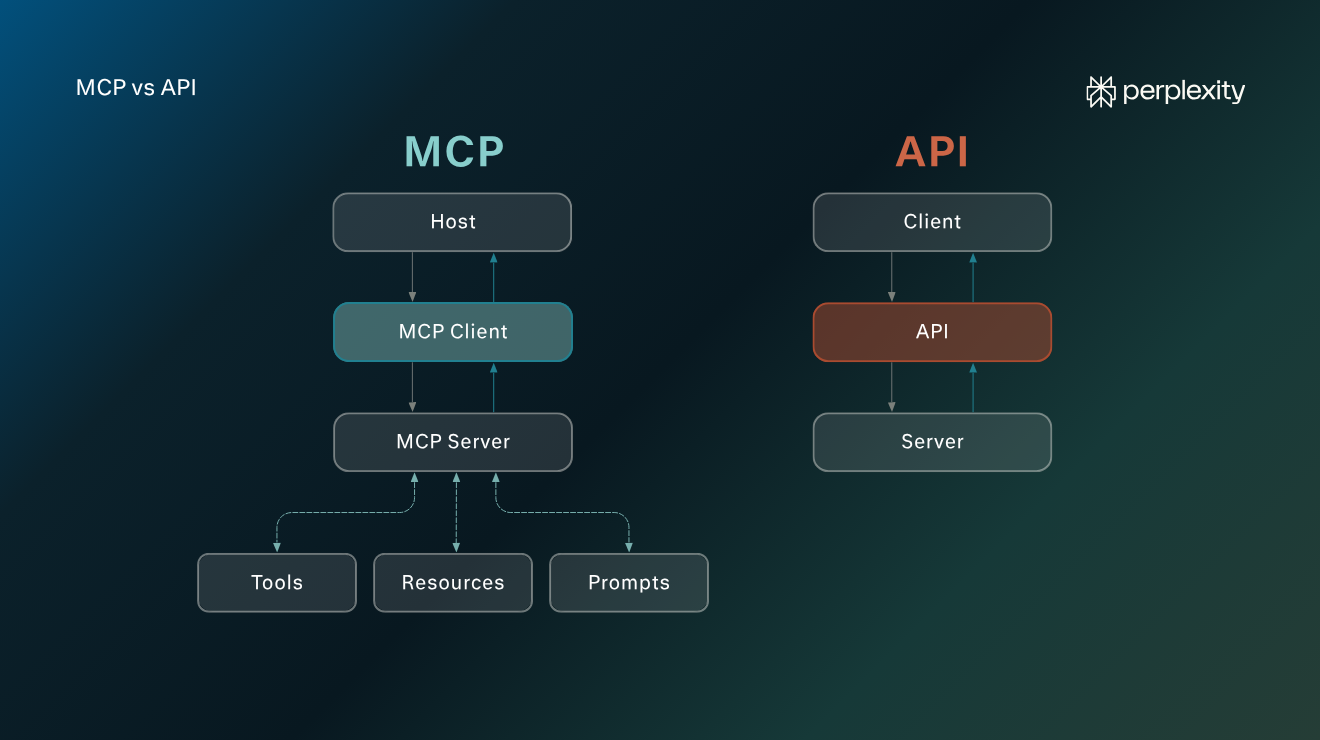
MCP, which stands for Model Context Protocol, is an open standard that AI agents use to access external systems: application functionality (tools), resources (including databases), and prompts.
Unlike an API, which connects two applications via set endpoints and parameters, MCP allows LLMs to discover up-to-date tools at runtime. MCP can also drastically reduce the time needed for integration maintenance.
MCP and APIs are not opposing technologies. MCP was designed to give AI-based applications comprehensive access to external functionality and information while reducing the need for bespoke API configuration. Often, MCP requests will trigger server-side API calls, and there are important developer use cases where APIs are still preferable over MCP.
MCP vs. API: What are the key differences?
- MCP is an open-source protocol (a set of rules) that allows AI tools to safely and autonomously call tools like databases, software functionality, and prompts.
- Compared to preconfigured APIs, MCP allows an LLM to select current external functionality based on task needs without bloating its context window.
- For traditional software integrations and some fixed, iterative LLM workflows, APIs are preferable.
- If AI functionality in your app is expanding, you manage a high volume of integrations, or vendor features change frequently, MCP is by far the better choice.
- Outside of the developer sphere, personal use of MCP connectors with the major AI chatbots (Claude, ChatGPT, Perplexity, etc.) doesn’t require any complex programming knowledge. Most have one-click integrations.
What is the Model Context Protocol (MCP)?
MCP is a widely used protocol for communication between an AI model and MCP server. The protocol makes it possible for an MCP client to call any of the tools and resources available on the MCP server.
There are three components that make up an MCP workflow:
- Host: The wrapper app (such as Perplexity) where the end user triggers an action or enters a natural language prompt, such as “tell me the weather in London.” The host provides the LLM with a list of available tools, and the LLM decides which tool is best suited to completing the task.
- Client: The protocol handler (built into the host) that connects to an MCP server using the MCP protocol.
- Server: The application that receives MCP requests and makes available or “exposes” the various functionalities it has access to.
It’s worth noting that MCP servers often use APIs to communicate with tools. If you connect Perplexity to the Slack MCP, for example, the client will speak to the MCP server, which will then use the Slack API to make requests detailed in the original MCP request.
What is an application programming interface (API)?
An API is an interface between two applications. Like MCP, it defines rules for how one system can request data or actions from another. A client sends a request using provider-specified parameters, and the server delivers a response.
Here’s a rundown of the different elements of an API request and response:
- Endpoint: The URL that you send the request to.
- Method: The action you want the server application to take.
- Parameters: The inputs you send for the server to process.
- Headers: Additional information like authorisation and response format.
- Request body: The data needed to execute the request (these are sometimes optional).
- Response: The information or success/failure status the server returns.
At a high level, almost everything an API does comes down to exchanging data with a system or requesting that the system perform an operation.
On the surface, this might seem similar to what an MCP connector does. However, the crucial difference is that with an API-based approach, different tasks require different endpoints, methods, and parameters, all of which must be maintained client-side. An MCP server makes all of its available functionality or data visible to an LLM without any need for client-side updates.
Use cases, benefits, and downsides
MCP | API | |
Main application | Workflows within an LLM-based tool | Defined requests between software platforms |
How they work | Access to multiple tools based on LLM Reasoning; all functionality is up to date because the vendor controls the MCP server | Software sends service-specific requests using predefined endpoints, methods, and parameters |
Discovery | LLM can see and use all tools the server exposes, including new ones | Software can only make API requests that have been preconfigured |
Primary use cases | AI-based and agentic workflows; dynamic tool selection based on natural-language prompts; vendor integrations for AI tools | High-volume data transfers; fixed, repeatable workflows; traditional software integrations |
Additional use cases | Coding assistants with access to multiple files and repositories; natural-language access to enterprise systems; internal reusable integrations for AI tools | Custom integrations; online transactions; scheduled data retrieval; vendor integrations for AI tools that aren’t MCP-enabled |
Setup time | Minimal once the MCP connection has been established | APIs need to be configured individually within an app to access new functionality |
Downsides | There is often a high token cost for complex tasks; too resource intensive for well-defined, repetitive data tasks | Extremely high maintenance costs for apps with complex integrations; doesn’t guarantee access to current functionality |
Benefits | Universal standard, capable of handling complex workflows, greater access to tools, hands-off once set up | Less token-intensive for fixed and high-volume workflows in AI tools |
Practical illustration of MCP vs. API
Let’s look at a simple example that illustrates the differences between MCP and APIs. In this scenario, the request is actually better suited to an API (it’s simple and doesn’t require context). However, the two examples clearly show how MCP is optimal for multi-stage LLM workflows.
Here is a script (written in Python) that sends an API request for weather information using the Open-Meteo API:
import requests
url = "https://api.open-meteo.com/v1/forecast"
params = {    "latitude": 51.5072,    "longitude": -0.1276,    "current": "temperature_2m"}
response = requests.get(url, params=params)
data = response.json()
temperature = data["current"]["temperature_2m"]
print(f"Temperature in London: {temperature}°C")
This example uses a precise request format to query Open-Meteo via HTTPS for the current 2-metre temperature for latitude 51.5072 and longitude -0.1276 (London).
Conversely, an MCP client could send a tools/call JSON-RPC request like the following to a server with access to a weather database:
{
  "jsonrpc": "2.0",
  "id": 1,
  "method": "tools/call",
  "params": {
    "name": "get_weather",
    "arguments": {
      "city": "London"
    }
  }
}
In this imaginary example, the client is asking the server to use a specific tool (get-weather) in its registry to execute a task (describe the weather for London).
The key difference is that this piece of functionality would be one of many provided by the MCP server. There’s no need for the MCP client to know specific endpoints, parameters, response structures, or authentication methods to generate the request. The LLM can review the descriptions of the tools in the registry to pick the ones it deems most suitable for completing a task described in natural language.
How to choose between MCP and an API
MCP and APIs aren’t opposites. MCP was designed to allow for easier discovery and maintenance of integrations. As such, APIs are often the best option for non-AI software connections and LLM tasks and workflows that are fixed and rely on a specific group of stable APIs.
When to use an MCP
- You need to manage a large or growing toolset: An MCP client can discover all the tools exposed by a vendor server at runtime, reducing individual API configuration overheads as your toolset grows.
- Tool choice depends on user requests: MCP is useful when task steps cannot be predetermined, such as if users are prompting a chatbot with a wide range of requests. The LLM can inspect available tool names, descriptions, and schemas, then choose the ones best suited to a task.
- Vendor functionality changes frequently: When vendors add new functionality to their apps, it is available immediately via MCP. You don’t need to add new APIs or reconfigure existing ones.
- You want the same integrations available across multiple AI applications: One MCP server can expose the same capabilities to several agents or applications, reducing duplicate integration work.
When to use a direct API
- You’re retrieving structured data: If your AI tool retrieves predictable structured information, such as a shipping status or customer support ticket number, at a set stage in the user workflow, a standard API request is less token- and time-intensive.
- Your workflow is organized into a fixed sequence: If your workflow follows a strict, repeatable sequence with precise APIs and an exact outcome, there’s no need to use MCP.
- Your app executes a high-volume workflow: Token usage can be particularly prohibitive for high-volume tasks. If a complex workflow requires iterative high-volume inputs or outputs in conjunction with Reasoning, it is preferable to use a mix of MCP and API calls.
- AI reasoning carries no benefit: If ordinary application logic can adequately complete a task, a direct API call is usually simpler and less resource intensive.
Using an MCP connector in Perplexity
The MCP vs. API question largely concerns developers who build apps with AI features. However, you might also be wondering whether or not to use MCP for your professional workflows in your chosen AI tool.
The same general rules apply: if you want up-to-date access to third-party application functionality with broad coverage, MCPs are the way to go. For rote and high-volume tasks, a simple API setup will consume fewer tokens.
Most AI tools, including Perplexity, allow users to set up and use MCP connectors with zero coding work. This makes it possible to orchestrate multi-step workflows without leaving the chat interface. For example, it’s possible to integrate with platforms like Gmail, Hubspot, and Supabase in just a few clicks.
Why MCP makes LLM-based apps more powerful
The core benefits of MCP are dynamic discovery and reduced API maintenance overhead. By connecting your app to an MCP server, you gain access to all of the latest tools, data, and prompts made available by your chosen vendors (or your local systems).
However, APIs are still crucial. They constitute the underlying architecture of app interconnectivity. MCP acts as an intermediary layer between an app and external functionality. It allows AI agents to access the broadest possible set of tools in a format that makes sense for complex workflows.