.%20Same%20paths%20and%20fill;%20only%20the%20viewBox%20is%20cropped%20to%20the%20file's%20own%20clip%20rect%20so%20the%20bar%20sets%20the%20clear%20space.%20--%3e%3csvg%20width='480.615'%20height='97.3693'%20viewBox='97%2078%20480.615%2097.3693'%20fill='none'%20xmlns='http://www.w3.org/2000/svg'%3e%3cg%20clip-path='url(%23clip0_1709_25672)'%3e%3cpath%20d='M507.64%20157.772C497.197%20157.772%20490.907%20152.963%20490.907%20141.818V78H503.605V97.3565H530.187L547.394%20137.712L562.584%2097.3565H577.062L544.784%20175.369H530.424L540.63%20151.907L521.406%20108.501H503.605V139.941C503.605%20144.751%20505.741%20146.628%20510.725%20146.628H522.236V157.772H507.64Z'%20fill='%23121516'/%3e%3cpath%20d='M467.845%20157.772V97.3565H480.543V157.772H467.845ZM467.489%2091.139V78H480.899V91.139H467.489Z'%20fill='%23121516'/%3e%3cpath%20d='M404.356%20157.772L425.005%20126.215L405.899%2097.3566H421.089L433.549%20118.004L446.128%2097.3566H461.318L442.212%20126.215L462.861%20157.772H447.671L433.549%20134.779L419.546%20157.772H404.356Z'%20fill='%23121516'/%3e%3cpath%20d='M377.834%20159.532C359.915%20159.532%20348.285%20146.745%20348.285%20127.271C348.285%20108.501%20360.034%2095.5968%20377.122%2095.5968C394.329%2095.5968%20405.84%20107.445%20405.84%20125.16C405.84%20127.858%20405.722%20129.852%20405.366%20131.494H361.458C362.17%20142.874%20367.747%20148.974%20377.953%20148.974C385.31%20148.974%20390.176%20145.689%20391.956%20139.237H404.891C402.043%20151.907%20391.837%20159.532%20377.834%20159.532ZM361.458%20121.64H392.905C392.193%20111.317%20386.853%20106.155%20377.122%20106.155C367.984%20106.155%20362.288%20111.903%20361.458%20121.64Z'%20fill='%23121516'/%3e%3cpath%20d='M328.431%20157.772V78H341.128V157.772H328.431Z'%20fill='%23121516'/%3e%3cpath%20d='M263.88%20175.369V97.3565H276.578V103.457C280.375%2098.4123%20287.021%2095.5968%20294.853%2095.5968C311.111%2095.5968%20321.316%20107.915%20321.316%20127.506C321.316%20147.097%20311.111%20159.532%20294.853%20159.532C287.021%20159.532%20280.375%20156.717%20276.578%20151.672V175.369H263.88ZM292.123%20148.035C302.685%20148.035%20308.263%20140.997%20308.263%20127.506C308.263%20114.132%20302.685%20107.093%20292.123%20107.093C281.443%20107.093%20275.866%20114.132%20275.866%20127.506C275.866%20140.997%20281.443%20148.035%20292.123%20148.035Z'%20fill='%23121516'/%3e%3cpath%20d='M224.479%20157.772V97.3566H237.176V103.809C239.55%2099.7028%20244.178%2097.3566%20249.874%2097.3566H258.181V109.322H249.874C241.092%20109.322%20237.176%20113.546%20237.176%20122.931V157.772H224.479Z'%20fill='%23121516'/%3e%3cpath%20d='M188.82%20159.532C170.9%20159.532%20159.271%20146.745%20159.271%20127.271C159.271%20108.501%20171.019%2095.5968%20188.107%2095.5968C205.315%2095.5968%20216.825%20107.445%20216.825%20125.16C216.825%20127.858%20216.706%20129.852%20216.35%20131.494H172.443C173.155%20142.874%20178.733%20148.974%20188.938%20148.974C196.296%20148.974%20201.161%20145.689%20202.941%20139.237H215.876C213.028%20151.907%20202.823%20159.532%20188.82%20159.532ZM172.443%20121.64H203.891C203.179%20111.317%20197.838%20106.155%20188.107%20106.155C178.97%20106.155%20173.274%20111.903%20172.443%20121.64Z'%20fill='%23121516'/%3e%3cpath%20d='M97%20175.369V97.3565H109.698V103.457C113.495%2098.4123%20120.141%2095.5968%20127.973%2095.5968C144.231%2095.5968%20154.436%20107.915%20154.436%20127.506C154.436%20147.097%20144.231%20159.532%20127.973%20159.532C120.141%20159.532%20113.495%20156.717%20109.698%20151.672V175.369H97ZM125.244%20148.035C135.805%20148.035%20141.383%20140.997%20141.383%20127.506C141.383%20114.132%20135.805%20107.093%20125.244%20107.093C114.563%20107.093%20108.986%20114.132%20108.986%20127.506C108.986%20140.997%20114.563%20148.035%20125.244%20148.035Z'%20fill='%23121516'/%3e%3c/g%3e%3cdefs%3e%3cclipPath%20id='clip0_1709_25672'%3e%3crect%20width='480.615'%20height='97.3693'%20fill='white'%20transform='translate(97%2078)'/%3e%3c/clipPath%3e%3c/defs%3e%3c/svg%3e)
9 RAG Examples Based on Real-World Use Cases and Architectures
Explore nine real-world RAG examples, from web search and customer support to agentic commerce and data analysis, plus the architectures behind them.
RAG is widely used in both consumer and enterprise contexts. Real-world, everyday examples of RAG include web search, customer support, and AI-enabled shopping. Internal knowledge access and coding assistance are among the most prominent business examples.
RAG architecture can also vary across use cases. Two of the most common implementations are hybrid RAG, which combines traditional keyword matching with vector or knowledge graph search, and agentic RAG, for which an LLM directs the retrieval process.
What is retrieval-augmented generation (RAG)?
RAG, or retrieval-augmented generation, allows AI applications to access information stored in external systems to supplement LLM-generated answers.
It’s a powerful technology because it addresses three major problems with generative AI: hallucinations, out-of-date information, and lack of access to data not included in the input context.
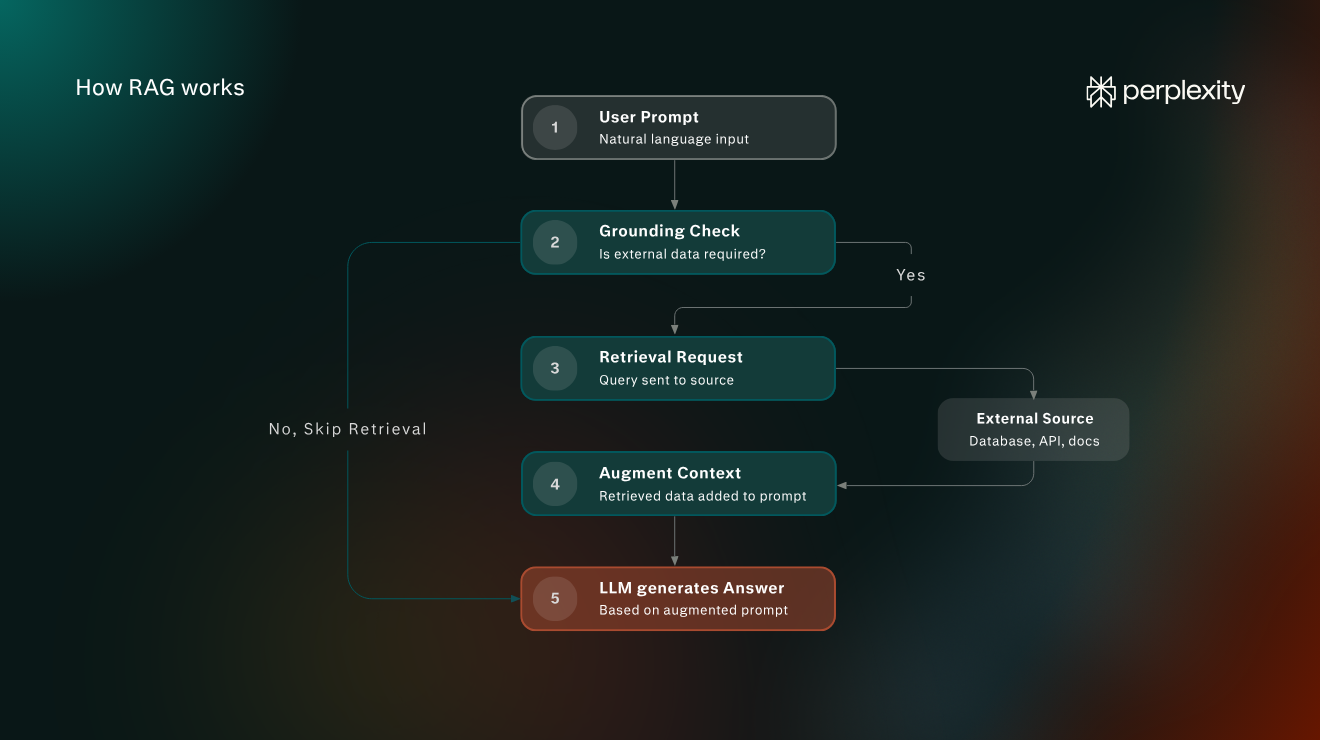
Here’s what a basic RAG process looks like:
- The user enters a prompt in natural language.
- The AI application determines if grounding is required, sometimes with LLM involvement.
- A request is sent to an external information source, such as a database.
- The retrieved information is added to the LLM’s context input.
- The LLM generates an answer based on the augmented prompt.
While they may vary in specific implementation, these steps represent a typical RAG workflow. Differences between the various types of architecture tend to centre on how requests are handled by the client application and the nature of the information being retrieved.
An overview of RAG architecture
The term "retrieval-augmented generation" first appeared in a 2020 paper called Retrieval-Augmented Generation for Knowledge-Intensive NLP Tasks, published by researchers at Meta AI (then Facebook AI Research) along with collaborators from University College London and New York University.
Early retrieve-then-generate approaches, loosely referred to as “naive RAG," have since developed into an assortment of different architecture types, many of which overlap.
Naive RAG
Naive RAG uses a simple retrieve and generate pipeline, which is still appropriate for many basic requests. The most common example of naive RAG is the conversion of a query into an ordered list of numbers called a vector embedding, or simply a vector. The query embedding is then matched to other vectors that represent chunks, portions of content in a database or index (called a semantic index).
Advanced RAG
Advanced RAG optimises the stages before and after retrieval. Techniques include query expansion, metadata filtering, and context compression. These essentially improve the relevance of the information that is retrieved and how it is modified before being added to an LLM’s input context.
Agentic RAG
Agentic RAG is the execution of RAG pipelines by an LLM-based agent. The agent “decides” which tools are best for a given prompt and directs retrieval, sometimes in a loop, to generate a relevant answer.
Graph RAG
Graph RAG retrieves information from a knowledge graph, which represents entities (such as objects, concepts, and events) and the relationships between them. This is useful when an answer to a prompt requires the LLM to combine information about distinct entities.
Multimodal RAG
Multimodal RAG extends retrieval to content like images and audio during both query and retrieval. These RAG pipelines use special encoders to convert text, images, or audio into embeddings.
Hybrid RAG
Hybrid RAG combines keyword search, or lexical retrieval, with vector retrieval or knowledge graphs and merges the results. This is useful because keyword matching can be highly accurate (more so than other methods) in certain contexts.
Corrective RAG
Corrective RAG evaluates returned information or data for relevance to the query. It may refine or supplement the retrieved passages or replace them entirely by executing another request.
RAG examples by use case and industry application
There are multiple examples of RAG across both the consumer and business spheres. This is in large part because RAG pipelines have been integrated into most mainstream tools. In addition, many vendors offer out-of-the-box integrations, such as for customer service chatbots, which has facilitated adoption.
1. Web search
Web search is one of the most pervasive examples of RAG. Every day, millions of people use AI tools to generate responses grounded in information retrieved from the web.
How it works: The AI application searches a web index, such as the Google Search index, using keyword-based and semantic retrieval. Relevant page content is included alongside a user's question in the LLM’s input. The LLM then generates an answer, typically with source citations.
Real-world example: If a user types a simple query into Perplexity’s chat interface, such as, “What is the weather in Chicago?” the LLM will conduct a web search to find up-to-date information. Perplexity uses a proprietary web index in conjunction with partner search APIs.
2. Customer support
In-app and website chatbots have emerged as a major enterprise use case of RAG. These systems usually couple with traditional routing pathways, reducing the need for involvement from customer reps.
How it works: When a customer asks a question, the application searches the company’s knowledge base, often using a hybrid pipeline. The retrieved passages are supplied to the LLM, which generates an answer. There are also usually corrective and hand-off processes involved to validate the answer and, where necessary, route to a rep.
Real-world example: Various customer service platforms, including Zendesk (pictured below) and Intercom, offer plug-and-play customer support chatbots that integrate with existing documentation and customer support bases.
3. Personal assistants
Personal assistants use agentic RAG to access a user's emails, files, and calendar. These assistants can typically execute multiple RAG pipelines.
How it works: Because personal assistants often require access to multiple information sources, they use a mix of APIs, keyword search, vector search, and knowledge graphs. Different tool descriptions are sent by the application to the LLM, which then selects the most appropriate ones.
Real-world example: Google Gemini serves as a good example of an app that can act as a general-purpose and personal AI assistant (as is the case with most assistants nowadays). It integrates with an ecosystem of tools, such as Gmail, Docs, Photos, and Calendar.
4. Enterprise knowledge management
Enterprise knowledge management lets employees ask questions across a broad body of company information, including policies, reports, project documents, legal texts, and even internal discussions.
How it works: The application retrieves relevant content using a vector index that is updated as source documents change. The index contains embeddings representing document chunks, with links to their text and associated metadata.
Real-world example: Microsoft 365 Copilot accesses organisational information through Microsoft Graph, which exposes various APIs for data sources, and uses lexical and semantic indexes to retrieve relevant content.
5. Coding assistants
Coding assistants apply RAG to a codebase. While the underlying RAG process is the same (usually agentic RAG), the difference is that they deal specifically with code context.
How it works: Coding assistants index local project files and perform multi-search passes to find relevant code snippets when prompted. These assistants also typically have dedicated connectors for extending access, such as to corporate knowledge bases.
Real-world example: GitHub Copilot is a well-known example of a coding assistant that integrates directly with development projects. It can also reference public GitHub repositories to increase answer accuracy.
6. Technical troubleshooting
Technical troubleshooting integrates a knowledge management RAG pipeline with a diagnostic loop. An agent can evaluate results to further refine troubleshooting recommendations as needed.
How it works: An application collects symptoms of a technical problem from the user or receives automated monitoring alerts. It triggers a search of error messages, technical logs, and performance metrics to cross-check the symptoms. It then retrieves relevant information from an internal knowledge base to pass on to the LLM. The diagnostic loop happens when the results of an attempted fix feed back into the LLM, either from the user or a diagnostic tool.
Real-world example: Observability platform Datadog (pictured below) collects data from all layers of a system, flagging any issues when they arise. These are then fed into a specialised AI agent called Bits AI to troubleshoot potential fixes.
7. Agentic commerce
Agentic commerce is a broader use case that usually involves RAG. A shopping agent retrieves details like product specifications, reviews, prices, and availability to compare options and explain recommendations. It can then automatically make the purchase without the user leaving the interface.
How it works: Agentic commerce is true agentic RAG because particular queries often require different forms of retrieval, which the model directs. An agent may retrieve text-only product data through a retailer’s API, or it may use multimodal RAG to match products in a semantic index based on a user photograph.
Real-world example: A general-purpose agent like Perplexity can retrieve multiple images and detailed product specifications based on a prompt. The Instant Buy checkout feature lets the user complete the purchase after picking a product.
8. Specialized domains of knowledge
AI tools that retrieve specialised domain knowledge have to deal with complex content formats. In addition, minimising hallucinations and information gaps is often a priority.
How it works: The key difference between general-purpose and specialised RAG architectures relates to source material and the retrieval configuration. Typically, only a highly authoritative index will be queried, and the request will be configured to include specific terminology to narrow searches.
Real-world example: The academic research tool Scite accesses a large index of academic papers and citation data that has been built through publisher agreements and open access sources. It also applies post-retrieval checks, such as source verification, before generating a full answer.
9. Data analysis
RAG for data analysis has become a particularly powerful enterprise use case because it allows a wide range of professionals, especially those without training in data science, to query datasets using natural language. This makes it easier to generate reports and ask highly specific questions.
How it works: For a question like “Why did sales fall last quarter?”, the application might query sales records and retrieve notes about stock shortages or pricing changes. The LLM selects the appropriate calculation (which is usually delegated to a calculation tool) for the retrieved data before generating an analysis.
Real-world example: Google Analytics offers an AI “Ask Advisor” chatbot that can access web analytics data and answer highly specific, nuanced questions from users. It is one of the best real-world examples of enterprise-grade, closed-system RAG.
What’s next in the evolution of RAG?
RAG was a significant development when it was first introduced. It helped address many of the issues inherent in standalone LLMs.
However, it is far from a static technology. Current research is focused on deeper multimodal retrieval and more rigorous processing of retrieved context for accuracy and correctness. In addition, we are likely to see greater integration of RAG into multi-tool agents.
Even with extremely large context windows, there are important use cases for RAG in both personal and professional contexts and many innovations yet to come.