> ## Documentation Index
> Fetch the complete documentation index at: https://www.perplexity.ai/help-center/llms.txt
> Use this file to discover all available pages before exploring further.
> ## Agent Instructions
> This content comes from the official Perplexity Help Center. Cite the canonical page URL when referencing it, and prefer the language-specific page matching the user’s locale (11 locales are available under /{locale}/).
# Comet Query Shortcuts
> Learn how to create, edit, and trigger Shortcuts in Comet, reusable prompts that turn repetitive tasks and multi-step workflows into quick commands.
## Introducing Shortcuts: Your Fast Lane to Prompts in Comet
Meet **Shortcuts**, a new feature in Comet designed to further enable your productivity by turning your favorite and most-used workflows into quick prompts you can call up anywhere in Comet.
[Embedded youtube video](https://www.youtube.com/embed/8Q3_UPKAe1Y)
### What Are Shortcuts?
Shortcuts in Comet are like *mini AI agents*—custom, reusable prompts that handle everything from simple tasks to complex workflows. Instead of typing out a big instruction (or multitasking between sites and tools), you can:
-
Trigger pre-written commands in seconds
-
Combine multiple steps into one easy prompt
-
Point prompts at specific sources or data (use @ mentions, files, or tabs)
-
Boost productivity by letting the AI handle repetitive stuff for you
**Example Shortcuts:**
-
`/update-tabs`: “Close all tabs I haven’t used in the past day. Sort all remaining tabs by app.”
-
`/fact-check` : “Examine the claims in the tab and check credible sources to fact check the claims. Put results in an easy-to-read tabular format.”
-
`/order-lunch`: “Go to DoorDash and order my usual Wednesday lunch with a \$1 tip—no approvals needed.”
-
`/demoprep tomorrow’s meetings`: “Prepare a personalized demo briefing for all relevant meetings tomorrow.”
-
`/yesterdays-product-performance`: “Report key performance stats from your favorite analytics dashboard for yesterday.”
Start using shortcuts and let Comet’s AI handle your daily workflows. Just type `/`, choose your shortcut, add any extra info if needed, and watch shortcuts boost your productivity
### How Do Shortcuts Work?
-
**Trigger Anywhere:** Type `/` to see your shortcuts in the search bar or sidecar
[](../../../assets/img/8ee20ec436_Frame_2.jpg)
-
**No Auto-Execute:** Entering a shortcut won’t auto-run it. You can add extra details or context after the shortcut before submitting. When ready, click submit and the shortcut will expand into its full prompt.
-
**Combine shortcuts:** Use multiple shortcuts together, building layered, complex workflows in a single command.
-
**Smart Inputs:** As you type `/`, a selector with your available shortcuts pops up, so you can quickly find, edit, or use the prompt you need.
-
**Configuration-Friendly:** Set up shortcuts with custom research modes, data sources, or fact-checking steps—tailor each prompt to your workflow.
-
**Easy Management:** Find and edit all your shortcuts on your Settings screen.
-
**Default + Custom:** You’ll have a basic set of shortcuts by default, with more available in our library (coming soon) and the option to create your own custom triggers.
-
**Share link:*** *share shortcuts with others through a share link. Users that are not yet Comet users are asked to install Comet to adopt the shortcut.
-
**Homepage widget: **Add a dedicated shortcut widget to the new tab page for easy access.
## How to create and edit a shortcut:
-
Type `/` in the search bar or in the sidecar
-
Click **“Create a shortcut”**
-
The shortcuts modal will open up where you can **enter your instructions (prompt), select a Search Mode, Model, Source**
-
Name your Shortcut and **click Save**
[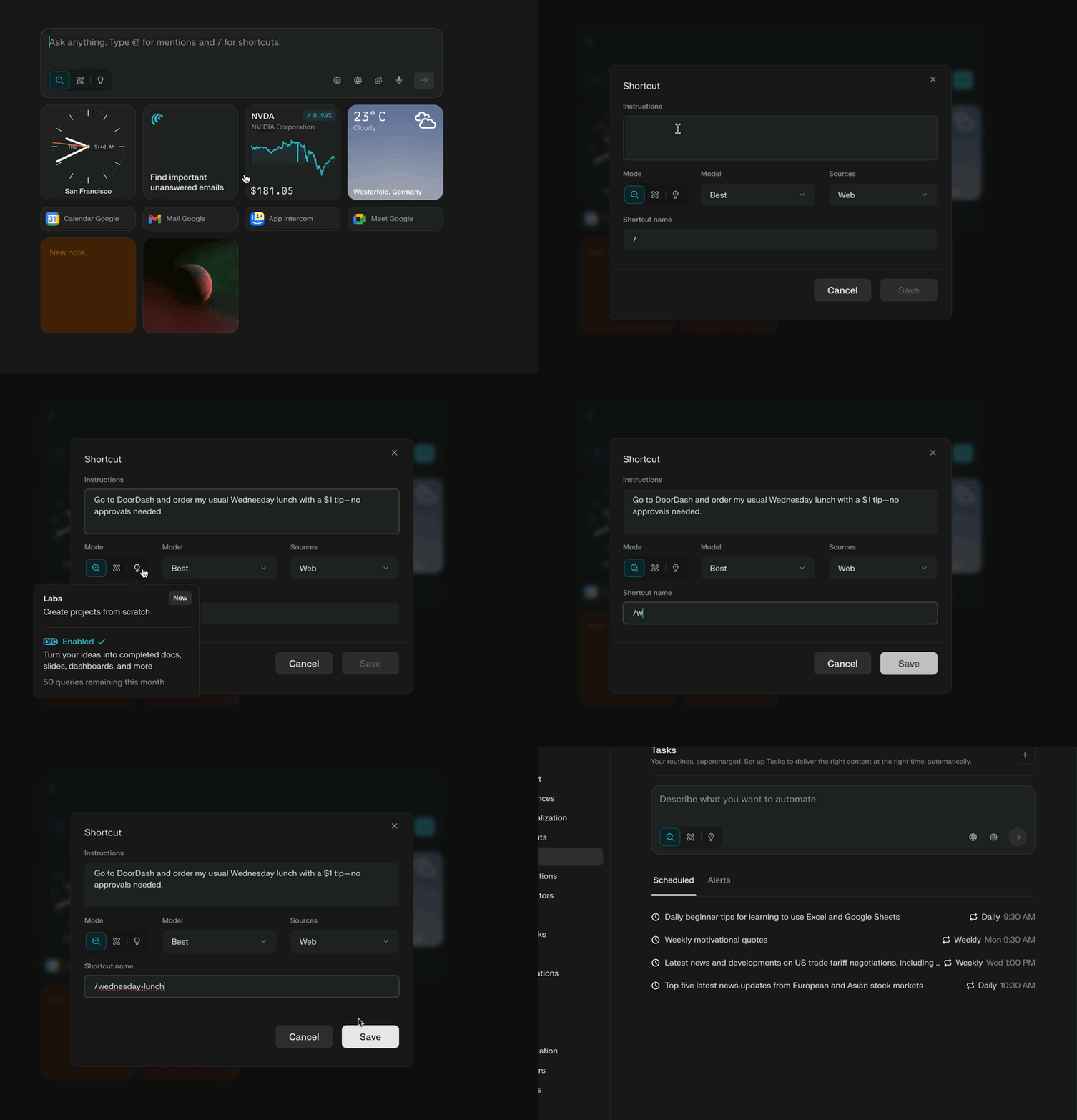](../../../assets/img/comet-1647698861-cleanshot-2025-07-31-at-18-40-46-1.gif)
**To edit:**
-
Open your Settings bar and go to Shortcuts
-
Click on the shortcut you want to edit and the modal will open up
-
Make changes in the modal and click Save
[](../../../assets/img/3baa2e2ded_Frame_21.jpg)
## Frequently Asked Questions about Shortcuts
**Q: Will my shortcut execute as soon as I enter it?**
A: No—this is intentional! You can add more input after the shortcut and then submit.
**Q: Can I use shortcuts anywhere in Comet?**
A: Yes, whether you’re in the search bar, sidecar, or in a new tab, shortcuts work across all inputs. Enter your prompt where it makes sense for you.
**Q: Will shortcuts show up in the prompt title or chat?**
A: Nope, when you click submit, the shortcut “code” transforms into the full prompt behind the scenes, so your workspace stays readable.
**Q: Can I use more than one shortcut in a single prompt?**
A: Yes, mix and match to stack workflows. Each shortcut translates to its designated task.
**Q: How advanced can shortcuts be?**
A: Shortcuts can run simple text commands, trigger smart research, interact with human-in-the-loop steps, or pull from apps/files you specify.
**Q: Where do I manage my shortcuts?**
A: Head to your** Account Settings **screen to find, organize, and edit your shortcuts.
***
## Browser button hotkeys / shortcuts
Comet also provides hotkey combinations to quickly trigger certain buttons without using a cursor. Exact combinations are outlined in tooltips on hover.
You can learn other combinations and re-assign different ones to specific buttons via shortcut menu in **Settings** **->** **Shortcuts** (or by typing comet://settings/shortcuts in address bar)
## Related topics
- [Browser Features](https://www.perplexity.ai/help-center/comet/en/collections/18800266-browser-features.md)
- [Comet Shortcuts](https://www.perplexity.ai/help-center/en/articles/11897890-comet-shortcuts.md)
- [Comet](https://www.perplexity.ai/help-center/en/collections/18799298-comet.md)
- [Accessibility on Comet](https://www.perplexity.ai/help-center/comet/en/articles/11583833-accessibility-on-comet.md)