
AI agent orchestration best practices: handling failures, approvals, and retries
This guide explains how AI agent orchestration works, compares centralized, decentralized, and hierarchical architectures, and covers seven best practices for handling failures, approvals, and retries in production.
Having several agents working on the same project sounds extremely efficient. One plans the work, another handles the design, and a third writes the code. It works until it doesn’t. And failures happen more often than you’d like.
Preventing these failures requires careful workflow engineering. So let’s unpack what makes orchestrated workflows unreliable and explore orchestration best practices for production reliability.
What is AI agent orchestration?
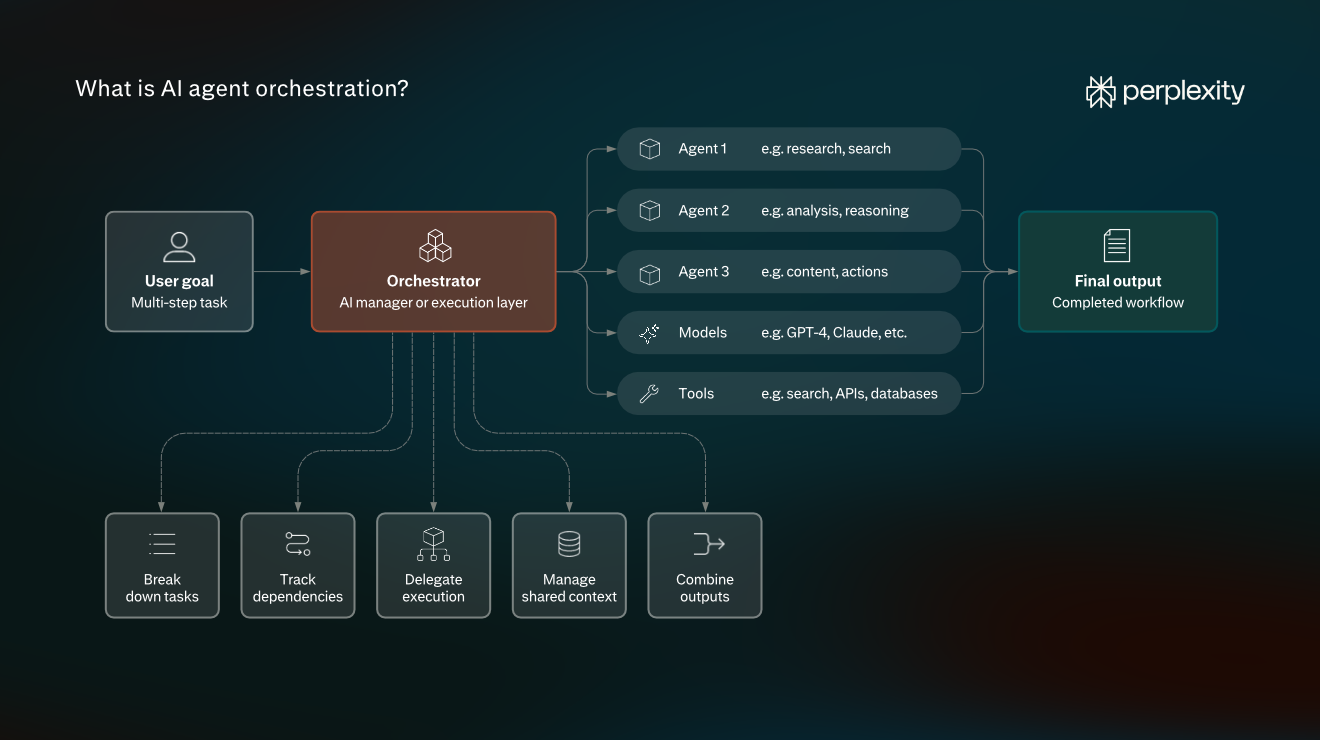
AI agent orchestration coordinates multiple AI agents, models, and tools to complete a multi-step task. But someone — or something — still needs to decide which agent runs first, what information it receives, and what happens after it finishes. This is the role of the orchestrator — an AI agent acting as a manager or a software-controlled execution layer.
In simple terms, an orchestration layer breaks a goal into smaller tasks, tracks dependencies, delegates execution to the right agents, manages shared context, and brings outputs together.
How AI agent orchestration works: Inside the execution engine
Let’s look at what happens after you give an orchestrator a task.
Consider an example from Perplexity’s Computer workshop: building an account intelligence dashboard using information from Salesforce, Snowflake, email, calendar, and recent news.
- Understand the goal and plan the work. The orchestrator starts with the requested outcome and decomposes it into tasks with explicit dependencies. In our dashboard example, that involves collecting information from different sources and turning it into a finished deliverable. The planner establishes which steps depend on others and which can run independently.
- Route tasks to the appropriate agents. The orchestrator identifies tasks whose dependencies are satisfied and delegates work to specialized agents or models. Dependent tasks wait for their prerequisites. Perplexity Computer uses multiple frontier models, routing different parts of the workflow to systems suited to those tasks. This also allows independent work to run in parallel.
- Execute tool calls within controlled environments. Agents interact with their environment through tools, such as web search, APIs, connected applications, file operations, or code execution. The execution layer runs these actions and returns results to the agents.
- Pass results and context between agents. Once an agent finishes its task, the next downstream agent needs the relevant output to continue. A handoff record could contain a task ID, output reference, schema version, and source metadata. The orchestrator coordinates these handoffs while maintaining the context needed for subsequent steps. Importantly, agents don’t have to carry the entire history of every other agent’s work in their own context windows.
- Record execution state separately from agent context. As agents start, complete, or fail tasks, the execution engine updates a persistent workflow record with task statuses, execution attempts, output references, and remaining work. This record lets the orchestrator track progress and resume after interruptions without relying on an LLM to reconstruct the workflow from conversation history.
- Validate results and decide what happens next. When a task returns, the orchestration layer checks whether its output meets the expected contract and whether the next task’s dependencies are met. If an issue is found, the workflow can return to an earlier step for correction or get paused. Otherwise, it proceeds toward completion.
A lot of moving parts happen behind what seems like simple AI agent orchestration. How you organize agent coordination determines how much control you have over execution. And of course, all that coordination adds overhead. So it’s not always worth it.
When should you use AI agent orchestration?
Consider multi-agent orchestration when different parts of the task need distinct expertise, independent work can run in parallel, or you can’t determine the next step upfront.
Hence, orchestration is helpful in three scenarios:
- Tasks require different specializations. A coding project, for example, might benefit from separate planning, design, development, and review agents.
- Independent tasks can run in parallel. Instead of having one agent complete everything sequentially, multiple agents can work simultaneously and return their results to an orchestrator.
- The problem is open-ended. Agents may need to explore different approaches, make decisions, and collaborate rather than follow a predefined sequence.
Other than that, orchestration is just a costly trend. More agents also mean more coordination and potentially higher token costs.
“I usually start with the simplest option and build from there. If we know the steps and they’re repeatable, that’s probably a workflow. I only see a reason to introduce multiple agents when they have different responsibilities, permissions, or users,” says Josh Spilker, head of search marketing at AirOps.
Even then, weigh the benefits against additional model calls, handoffs, latency, and failure points.
AI agent orchestration architectures and their trade-offs
Three common ways to structure agent coordination — centralized, decentralized, and hierarchical orchestration. Choosing the right architecture comes down to one question: Who controls the work, and how do agents coordinate with one another?
Centralized orchestration
In centralized orchestration, one orchestrator manages the process. It breaks down the task, delegates work to specialist agents, tracks their progress, and brings their results together.
The trade-off: Centralized coordination makes it easier to track execution and apply common rules at a single control point. However, the orchestrator can become a bottleneck, and its failure can interrupt the entire workflow unless the system supports recovery.
Decentralized orchestration
In decentralized orchestration, agents coordinate more directly rather than relying on one manager to make every decision. They can exchange messages, read shared state, and independently determine their next steps.
The trade-off: Agents can operate without waiting for a central planner, making this approach useful for exploratory work and independent contributions. But coordination becomes harder when agents disagree, update shared information, or need to reach a consistent result.
Hierarchical orchestration
Hierarchical orchestration extends the manager approach across multiple levels. A top-level orchestrator delegates responsibility to subordinate orchestrators, which coordinate their own groups of specialist agents.
Think of an enterprise workflow involving sales, finance, and legal teams. A top-level orchestrator could delegate each workstream to a domain-specific coordinator. Those coordinators would then manage their own specialist agents and report consolidated results.
This structure can help when workflows are too broad for one orchestrator to manage effectively.
The trade-off: Hierarchies let teams divide coordination responsibilities and potentially handle failures within individual branches. However, they introduce additional handoffs, more complex state management, and greater operational overhead. Local recovery also depends on how checkpoints and execution state are implemented.
How these architectures compare:
Criteria | Centralized | Decentralized | Hierarchical |
Execution ownership | One orchestrator controls delegation | Agents coordinate through peers or shared state | Responsibility is distributed across orchestration levels |
State consistency | Easier to coordinate through one control point | Requires explicit synchronization and conflict handling | Requires coordination within and across branches |
Failure isolation | Central controller can become a critical dependency | Individual agents can fail independently, but shared infrastructure remains critical | Failures may be contained within branches if designed for recovery |
Policy enforcement | Common controls can be enforced centrally | Policies must be enforced consistently across participants | Controls can be applied at global and domain levels |
Operational complexity | Generally lower | Higher coordination complexity | Higher complexity from multiple orchestration layers |
Sequential, parallel, and handoff-based execution
There’s one more distinction worth understanding. The architecture determines who coordinates the agents. The execution pattern determines how their tasks progress.
These are three execution patterns:
- Sequential workflows: Agents work in a predefined order, with one agent’s result becoming another’s input.
- Parallel execution: Independent agents work simultaneously.
- Handoff-based execution: Control moves between specialist agents as the task progresses. This is useful when another agent is better equipped to handle the next step, although each handoff must preserve the information needed to continue.
The patterns aren’t mutually exclusive, and they don’t map one-to-one to orchestration architectures. The goal is to choose the simplest structure that supports your workflow’s dependencies, coordination requirements, and acceptable operational overhead.
Common AI agent orchestration failures
Anything can go wrong with orchestration, from simple oversights to intricate blockers. Sometimes, an agent can even appear to do its job correctly while the overall workflow fails. Drawing on practitioners’ experiences, we’ve compiled some of the common mistakes behind unreliable orchestrated workflows — keep an eye out for them:
- Lossy agent handoffs. An orchestrator passes a summarized plan to a specialist agent, but the summary drops constraints, dependencies, or implementation details.
- Premature fan-in execution. A downstream agent starts aggregating results before all upstream tasks have finished.
- Non-deterministic shared-state updates. Parallel agents write to the same state keys without well-defined merge semantics. Depending on how the framework handles updates, this can result in lost writes, duplicated data, order-dependent output, or conflicting changes.
- Checkpoint and side-effect divergence. A task performs an external operation, but its successful execution isn’t durably recorded before the worker fails. On recovery, the orchestrator sees an unfinished task and re-runs it.
- Human-approval resume races. Pausing and resuming execution introduces its own synchronization problems.
- Delegation loops and retry amplification. Agents repeatedly hand work to one another because their responsibilities overlap, dependencies are circular, or completion conditions are ambiguous.
- Instruction-level controls mistaken for execution security. An orchestrator may tell agents not to access certain resources or perform sensitive actions, but model instructions don’t enforce operating-system permissions, network restrictions, or authorization boundaries. Perplexity’s security engineering research highlights why agents can cross security boundaries while pursuing legitimate goals, even without malicious instructions
Notice how different these failures are. A premature scheduler transition or an ambiguous external write can all produce an incorrect outcome, but they originate in different parts of the execution lifecycle. That’s why reliable orchestration requires more than improving prompts or adding retries.
7 AI agent orchestration best practices for production reliability
1. Define explicit task contracts, acceptance criteria, and stop conditions
Vague goals and an unclear definition of done often lead to disappointing agent-generated results. The solution is a prompt contract (a scope of work for an agent): agree on the goal, constraints, output format, and failure conditions before execution starts.
For example, here’s how you could define a contract for an agent responsible for fixing an intermittently failing integration test:
- Goal: Identify and fix the cause of a flaky checkout API integration test.
- Inputs: Test source code, CI failure logs, recent commits, and relevant application code.
- Constraints: Don’t disable tests, loosen assertions, or modify unrelated application behavior.
- Expected output: A code patch, explanation of the root cause, and test execution results.
- Acceptance criteria: The previously failing test passes across 10 consecutive runs, and the relevant regression suite passes.
- Failure conditions: The root cause can’t be established, the fix introduces regressions, or the required test environment is unavailable.
But there’s another important part: when should the agent stop?
An agent shouldn’t keep iterating indefinitely because it hasn’t produced a satisfactory result. Define what constitutes successful completion, when to return a partially completed task, and when to stop because a requirement cannot be met. Set maximum delegation depth and iteration limits or execution budgets so unresolved tasks don’t become endless loops.
Back to our CI example. You could define the following stop conditions:
- Success: The fix passes 10 consecutive test runs and the relevant regression suite.
- Iteration limit: The agent can attempt no more than two candidate fixes.
- Execution budget: The agent must stop after 60 minutes, even if the issue remains unresolved.
- Delegation limit: The agent can delegate work to one specialist agent, with no further subagent delegation.
- Partial completion: If both attempts fail or the time limit expires, the agent returns its findings, attempted changes, and test results.
- Blocked execution: If the test environment is unavailable, the agent stops and reports the blocker instead of claiming success.
2. Keep orchestrators lean and enforce structured handoffs
Sometimes developers give an orchestrator too many responsibilities, and instead of coordinating specialist agents, it starts writing code, debugging, or performing detailed reviews itself. This creates a bottleneck: the orchestrator spends its context budget on implementation details, delays delegation, and blurs responsibility for the results.
So let orchestrators do their job and enforce handoffs by referencing concrete artifacts: the original task, relevant inputs, output artifacts, execution status, and any unresolved issues.
Consider this example: status: completed refers to the agent’s assigned work, not the entire workflow. Since the tests are still pending, the orchestrator shouldn’t approve the final result.
{
  "task_id": "fix-42",
  "status": "completed",
  "artifact_ref": "patch-17",
  "test_status": "pending",
  "blockers": []
}
3. Persist workflow state and control context growth
An agent’s conversation history isn’t a reliable record of workflow progress. When its context window fills up, automatic compaction can drop important details. And if a worker crashes, the next agent needs to know which steps were actually completed.
For example, if the coding agent generates a patch and then crashes, the next worker should retrieve the saved artifact and continue from the recorded workflow state. But if the agent also triggered an external CI run, the orchestrator must reconcile that run separately before repeating the action
So keep the execution state separate from the agent’s working context. Save task statuses, execution attempts, completed steps, and artifact references in durable storage. Meanwhile, load only the instructions, inputs, and results relevant to the agent’s current task instead of stuffing the entire execution history into its context window.
4. Design failure-aware retries and recoverable tool execution
Say your CI agent triggers a test run, but the API request times out. Did the test run fail to start, or did the CI service queue it and lose the response?
A timeout doesn’t necessarily mean an operation failed. That’s why you need to distinguish between errors before deciding what happens next:
- Transient errors (429, 503): Retry with bounded exponential backoff and jitter, respecting Retry-After when provided.
- Validation or permission errors (400, 403): Stop or correct the underlying issue rather than repeating the same request.
- Ambiguous outcomes (timeout after a possible write): Review whether the operation succeeded before attempting it again.
Note: Even retryable errors need limits. Set a timeout for each tool call, cap retry attempts and total retry time, and enforce an overall workflow deadline so nested agents can’t keep restarting the same operation. If a dependency repeatedly fails, use a circuit breaker to temporarily stop requests.
For operations with external side effects, assign a stable idempotency key to each logical action and reuse it across retries. If the API supports server-side deduplication, it can recognize repeated requests without performing the action twice. If it doesn’t, query the external system using a correlation ID or other authoritative reference.
When you can’t establish what happened, stop and escalate.
An example of the retry logic for our CI agent, expressed as pseudocode:
op_id = get_or_create_operation_id(
    task_id=task_id,
    patch_id=patch_id,
    action="start_ci_run"
)

try:
    return ci.start_run(commit, request_id=op_id)
except TimeoutError:
    run = ci.find_by_request_id(op_id)
    if run:
        return run

    if ci.supports_idempotency:
        return bounded_retry(
            lambda: ci.start_run(commit, request_id=op_id)
        )

    raise NeedsReconciliation(op_id)
Code note: The example assumes the CI API supports looking up runs by request ID. The request_id only prevents duplicates if the provider explicitly guarantees idempotency. bounded_retry() is illustrative pseudocode. In production, retries should be limited by both a per-operation retry budget (maximum attempts or elapsed time) and the overall workflow deadline.
For longer workflows spanning multiple services, consider the Saga pattern to coordinate compensating actions when later steps fail. Just remember that compensation isn’t always a complete rollback. You can reverse a database update, but you can’t unsend an email.
5. Route and parallelize work with explicit resource budgets
There are two things to balance here: how much model capability each task needs and how many tasks you can run simultaneously. Get either wrong, and you risk agents competing for shared API quotas or relying only on expensive reasoning models.
For model selection, match model capability and reasoning effort to task complexity — simple but quite overlooked. Note that you can either configure routing rules and evaluate models yourself, or use an orchestration platform that handles model selection for you.
For instance, Perplexity Computer’s Effort Mode lets you choose how much effort a task deserves without manually selecting a model. Pick Light, Standard, High, or Ultra, and Perplexity automatically selects the orchestrating model and its reasoning level. That orchestrator then delegates subtasks to supporting agents, which can use models from different providers.
Perplexity evaluates model configurations for quality and cost, favoring less expensive options that deliver comparable results. You can also use Custom controls if you prefer to choose the model and reasoning level yourself.
For parallelism, the limit should come from your infrastructure and external dependencies. Validate the request and token rate limits of shared APIs, then load-test your workflow with increasing concurrency. Watch whether throughput improves or whether requests start queuing, slowing down, or returning 429 errors.
To keep resource consumption predictable, enforce resource limits and scheduling controls:
- Control concurrency and request rates: Cap in-flight calls per service and queue excess work. Remember that a concurrency cap alone won’t enforce requests-per-minute or tokens-per-minute limits.
- Track token and cost budgets: Account for usage across the entire workflow, including subagents, and stop launching new work when the remaining budget is insufficient.
- Enforce execution deadlines: Set task and workflow time limits, and propagate cancellation to running agents where supported.
- Respect dependencies: Start downstream tasks only when their required inputs are available, rather than launching every agent simultaneously.
6. Enforce approvals and isolate agent execution
Never ask the model to decide whether its own actions are safe. Instead, give agents least-privilege permissions and enforce risk-based approval rules in application code. If agents execute code, isolate that execution from your host environment and restrict access to files, networks, and credentials. This limits the damage if the agent makes a mistake or executes unsafe code.
“I’m skeptical of overly complicated multi-agent systems, especially when agents are reviewing and approving each other’s work. You can end up with several agents confidently passing the same mistake along, without anyone actually catching it,” cautions Spilker.
For actions that require human approval, pause execution and save the exact proposed operation:
- its parameters
- its target resource
- its commit or state version
- the reviewer’s decision
Also, define what happens if approval is rejected, expires, or needs escalation. This is essential for resumable frameworks, as resuming an interrupted node re-executes code from the beginning of that node. Any side effects before the interrupt may run again.
So if approval is rejected or expires, the request closes. If the target commit, parameters, or permissions change before execution, invalidate the approval and request a new one.
Spilker also doesn’t support the idea of fully autonomous, end-to-end agents perceived as the goal. “For me, the better approach is to build a few focused agents with clear responsibilities, defined permissions, and human review at the right points. You still get efficiency without giving up full control,” he concludes.
7. Verify outputs independently and test recovery behavior
Ever had an agent reporting Success when it actually failed? Annoying if not infuriating, and the fix isn’t quick because the agent’s final message won’t necessarily tell you where things went wrong.
To investigate, trace what happened during execution and independently verify the results. So let’s commit some time to isolating and resolving the issue.
Trace the workflow to identify what went wrong
Before debugging an agent’s prompts, capture the entire execution path. You need a trace that connects agent invocations, tool calls, errors, and retries under the same workflow run.
OpenTelemetry’s GenAI semantic conventions provide a standardized way to describe these operations. For example, invoke_workflow identifies workflow execution, invoke_agent an agent invocation, and execute_tool a tool call. Each operation can be recorded as a span with its timing, status, and relevant metadata.
This step gives you a trace of the execution path, so you can identify where an agent got a hiccup.
invoke_agent  generate_patch   OK
execute_tool  start_ci_run     OK  run_id=9812
execute_tool  get_ci_result    TIMEOUT

agent_response: "Success"
An illustrative execution trace.
Review the output independently
Use programmatic checks wherever possible. Validate outputs against JSON schemas, run unit and integration tests, check that required artifacts exist, and query external systems to confirm actions actually succeeded.
For outputs that require subjective judgment — and thus can’t be accessed through programmatic checks — introduce an independent reviewer agent. One approach is an implementer–reviewer–resolver loop, where one agent produces an artifact, a fresh-context reviewer identifies issues, and a resolver addresses them before validation runs again.
You still need to validate the reviewer findings where possible, and if you’re using LLM-based graders for repeated evaluations, calibrate their judgments against human-reviewed examples.
Inject failures to test recovery
So far, you’ve traced what the agents executed and checked whether their outputs were correct. But what happens when a worker crashes halfway through a task or an API times out after accepting a request? Surprisingly, your workflow might behave perfectly well under normal conditions but fail during recovery.
To test this, deliberately inject faults in a test environment:
- Simulate API timeouts
- Crash workers between external writes and checkpoints
- Return malformed tool outputs
- Expire approvals
After each test, inspect the execution trace to see which steps ran, where the workflow resumed, and whether any actions were repeated or skipped. Then review the actual results.
Say your CI agent sends a request to start a test run, but the API response times out. The agent retries, receives a successful response, and reports Success. Everything looks fine until you check the CI service and discover that two test runs were created instead of one.
That’s why you should verify both the workflow’s recorded state and the actual changes in external systems. A recovery test should pass only when the workflow reaches the expected state without unintended side effects.
Add failures you uncover to your regression tests so future changes don’t reintroduce them.
Ultimately, success means the workflow passed its required checks, and its external outcomes were verified.
AI agent orchestration FAQs
Why siloed AI agents break down at enterprise scale?
Siloed agents can complete their individual tasks correctly but produce inconsistent results together. Imagine a sales agent retrieving customer terms at 10:00, a pricing agent calculating a quote using updated prices at 10:05, and a legal agent checking a contract that changed at 10:07. Each agent works with a different snapshot of the business, so their outputs may contradict one another.
The problem becomes more pronounced at enterprise scale because agents interact with multiple systems that update independently, operate with different permissions, and don’t necessarily share context or execution state.
How do you prevent infinite retry loops in AI agents?
Set limits at multiple levels: maximum tool-call retries, maximum agent iterations, delegation depth, and an overall workflow deadline. Classify failures before retrying. For transient 429 responses, honor Retry-After when provided. Otherwise, use bounded exponential backoff with jitter.
Stop retrying unchanged requests after validation or permission errors. If a downstream service repeatedly fails, a circuit breaker can prevent agents from generating additional load.
How do you resume an AI agent workflow after a crash?
The recovery mechanism depends on your runtime. With LangGraph, a persistent checkpointer such as PostgresSaver stores graph state under a thread_id, allowing execution to continue from persisted state. With Temporal, another worker can reconstruct a workflow by replaying its event history. During replay, it reuses previously recorded activity results.
If the application is redeployed while workflows are still running, saved state and execution histories may no longer be compatible. Temporal addresses this through Worker Versioning and workflow patching. For checkpoint-based systems, plan schema migrations and test recovery against existing saved states before rolling out incompatible changes.
How do you test AI agent orchestration reliability?
Run the same representative tasks multiple times and distinguish pass@k (whether at least one of k attempts succeeds) from pass^k (whether all k attempts succeed)
Measure results by task category and workflow version rather than relying on one aggregate success rate. Track first-attempt success, consistency across repeated runs, p95 latency, cost per completed task, and the proportion requiring human intervention. Report sample sizes and uncertainty intervals for success rates.