
Context window: what it is and how it affects everyday AI use
A guide to the context window in AI models, covering how it's measured in tokens, what fills it during a conversation, how large it is in current models, what happens when a conversation passes the limit, and everyday habits for working within it.
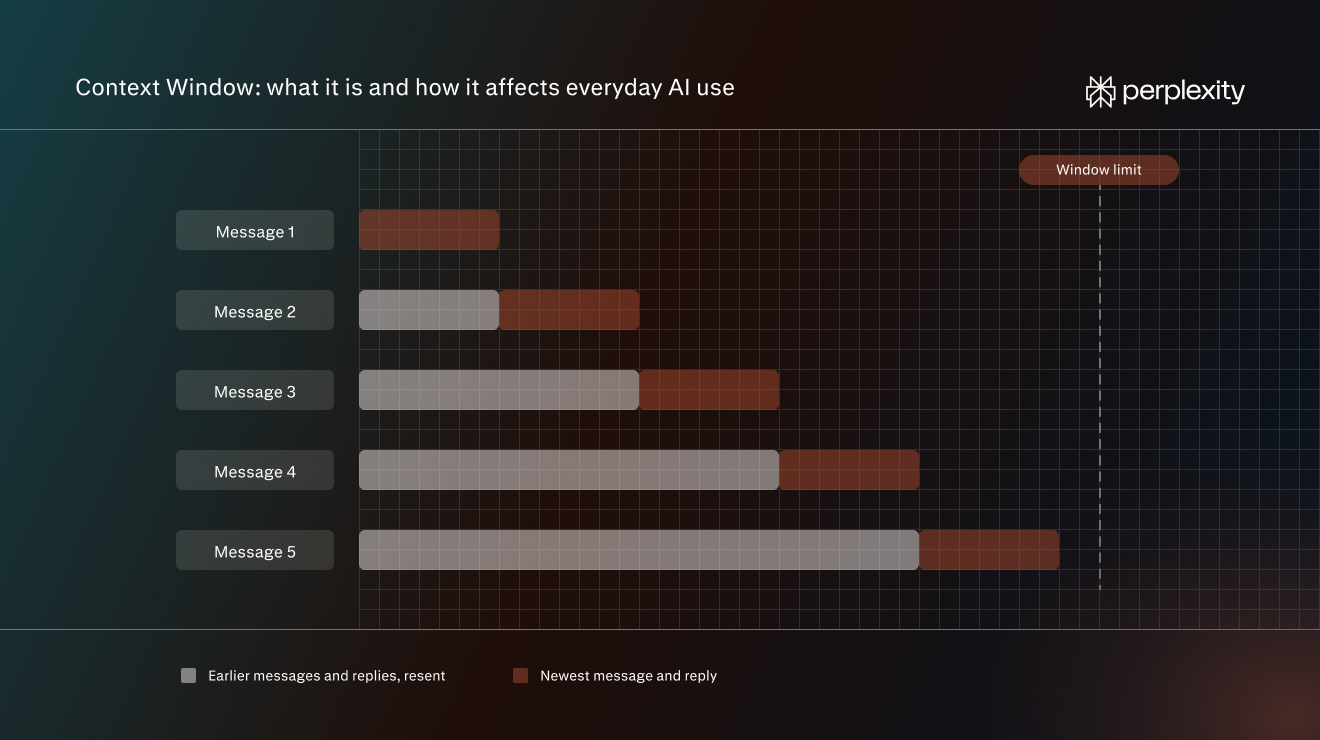
A context window is the amount of text an AI model can work with at one time. This guide covers what fills it, how large it is in current models, and how to work within it day to day.
What a context window is
A context window is the limit on how much text an AI model can handle at one time. The limit covers the text going in, such as a question and any document attached to it, and the answer coming out. If something doesn’t fit inside the window, the model can’t see it or use it when answering.
The context window is separate from what a model learned during training. Training happens before a model is released, on a very large body of text, and it gives the model its general knowledge and language skills. The context window holds only the material for the task in front of it.
The AI model itself doesn’t remember earlier messages. The app it runs in, such as Perplexity or ChatGPT, saves the conversation. With every new message, the app sends the model the whole conversation so far, not just the latest message. The model reads all of it again before replying, and that reply becomes part of what gets sent the next time. A conversation’s footprint in the window grows with every exchange, so a long chat made of short messages can still take up a lot of space.
How a context window is measured
Every message, document, and reply in a conversation takes up space in the window. The amount of space available is measured in tokens rather than a certain number of words or pages.
A token is a chunk of text the model handles as a single unit. It can be a short word, part of a longer word, a punctuation mark, or a word with the space in front of it. 100 tokens is about 75 words, according to OpenAI. Using that approximate English-language estimate, a 3,000-word report would be about 4,000 tokens.
Before a model reads anything, a tool called a tokenizer splits the text into tokens and converts each one into a number. The model processes those numbers, generates its reply as a sequence of tokens, and the tool converts them back into text.
Token counts aren't standardized. The count depends on the language and the content. Tokenizers can differ between models, so the same paragraph can produce a different number of tokens in different models.
Context window vs. saved memory
The context window holds what the model can use to answer the current question. For example, when an AI edits a report, the report, the editing instructions, and the messages exchanged while working on it take up space in the window.
Saved memory keeps selected details between conversations. In Perplexity, the app selects what to save automatically, looking for preferences and important information and giving weight to details that come up frequently. A lasting instruction such as “Use British English for all my writing” illustrates the kind of detail worth retaining, while “Make this paragraph shorter” applies to the task at hand.
When the app brings one of those details into a new conversation, it becomes part of the model’s context and uses space in the window. In Perplexity, memory controls are under Settings → Memory. Turning memory off stops its use in future answers but does not delete details already saved.
What fills a context window during a conversation
A context window holds far more than the words a person types. In a typical conversation, four kinds of text share the space: instructions from the app, the conversation history, material brought in from files or the web, and the model's reply. Most of it never appears on screen.
Instructions from the app
Before a person's message reaches the model, the app adds its own instructions (often called a system prompt). These tell the model how to behave: how to format answers, what tone to use, which tools it can use, and details like today's date. Some of this material, such as the app’s internal instructions, is not normally shown to the user.
Conversation history
This includes the model's earlier replies as well as all the person's messages for the current answer. Often, the AI’s replies are much longer than the user’s questions.
Uploaded files, web pages, and search results
Text brought in from files uses context space alongside the conversation, but an app may provide a whole file or select relevant passages. For instance, Perplexity can analyze short files in full and extract important parts from longer files to answer the query.
Search results take up space too. For instance, to answer a query, Perplexity might search the web and give the model the results to read.
The model's reply and reasoning
The reply is written into the same window, so the app has to leave room for it. Some models also generate internal reasoning while working on an answer, which the person may never see. Reasoning text is the model’s step-by-step working, such as breaking a question into parts or checking its own figures, written out before the final answer. It usually counts toward the window limit as well.
Context window sizes in current AI models
A larger context window means a model can handle longer documents, more sources, and longer conversations. The leading models from OpenAI, Anthropic, and Google now each offer a window of about 1 million tokens. That’s roughly 1,500 pages of text.
Model | Provider | Context window (tokens) |
GPT-6 Astra | OpenAI | 1.05 million |
Claude Opus 5.5 | Anthropic | 1 million |
Gemini 4 Argon | 1,048,576 |
Provider API specifications, checked November 5, 2026. Limits available inside an app may differ.
A larger window doesn't mean a model uses all of it equally well. Research has found that performance can become less reliable as input length grows, a pattern known as context rot.
Input limits and output limits
The context window is a shared budget for everything the model reads and writes. A model can read far more than it can write in one reply.
When processing an input, the model can work on many tokens in parallel. When generating an answer, it usually produces tokens in sequence, using what came before to choose what comes next. It can’t choose the fifth word of a sentence until it knows the first four, so it has to produce the reply one token at a time.
That makes long replies much slower and more expensive to produce than long inputs are to read. That's why a request to rewrite or translate a very long document can stop partway through, and why asking for the result in sections works better.
What happens when a conversation passes the limit
When a conversation gets too big for the context window, the app has to make room before the model can reply. Apps do this in a few different ways, and each one changes what the model can still see.
One approach is to drop the oldest messages first. The model keeps working with the recent part of the conversation. Early user instructions, decisions, or document passages may drop out of the window. The model can't refer to text it no longer has, but it won't necessarily tell the user that anything is missing.
Another approach is to summarize the earlier part of the conversation and keep the summary in place of the full text. This is a form of what’s called context compaction. A summary takes up far less space, so the conversation can run much longer. However, it might omit details such as exact figures, names, or wording.
When the model has dropped or compacted its context, it might start asking for information it should already know. It might suddenly stop following instructions given at the start, such as a format or preferred tone. It might contradict a user’s earlier decision, or get vague about documentation shared earlier.
Some apps stop the conversation instead and ask the person to start a new one, or turn down a message or file that's too long to fit.
Everyday habits for working within the context window
- Start a new thread for every new task: For example, review a report in its own conversation, rather than adding it to an existing thread about planning an event.
- Carry over only what’s needed: When a task builds on earlier work, ask the model to pull out the confirmed details and approved wording needed for the next task.
- Share only relevant information: For instance, for a question about how survey participants were selected, provide the methodology section and supporting notes rather than the whole report.
- Find the relevant section before sharing a long document: If a report or handbook has a table of contents, share that first. Ask the model which sections are likely to answer the question, then copy those sections into the conversation.
- Review long documents in parts: Divide a handbook or report by policy, chapter, or topic. Use separate threads for independent reviews, with the same instructions for each.
- Request long outputs in stages: For a lengthy rewrite or translation, ask for one section at a time in the same thread. Name the section or page range, and check the result before asking the model to continue.
- Set a useful answer length: Ask for five findings, a short explanation, or a table with specific columns. Avoid requesting a detailed analysis when a brief answer would do.
- Ask for targeted revisions: To change one paragraph in a draft, ask the model to rewrite that paragraph only. Specify what needs changing rather than asking it to reproduce the whole draft.
How Perplexity manages context
Perplexity’s context includes more than the conversation. It can also draw on information found through live search, saved preferences, and files provided for a task.
For a research question, live search supplies source material the model can use to build its answer, with citations showing where the information came from. For example, asking about a new regulation can bring relevant web information into the task without first collecting articles and pasting them into the chat.
Saved memory supplies a different kind of context: relevant details from earlier conversations, such as writing preferences or background about an ongoing project. Perplexity retrieves those details when answering, and memory works across the models it offers. A saved preference can therefore remain available when switching models within Perplexity.
For work spanning several conversations, Projects keep files and instructions together, and Project instructions apply to each query. A report’s audience, purpose, and writing requirements can stay with the Project, while research and drafting happen in separate threads.
Explore Getting started with Perplexity for guidance on asking questions, working with files, and building on answers with follow-up queries.
Frequently asked questions
Do images count toward a context window?
Yes. Images are converted into tokens that take up space alongside text. The amount of tokens depends on how the model processes them. A screenshot or scanned page uses context space even when its text hasn’t been copied into the chat.
Does a larger context window cost more?
Not necessarily. A larger window describes how much a model can handle, not how much of that capacity a task uses.
Is there a way to see how much of the context window a conversation has used?
Sometimes. Some apps show a context meter indicating how full the window is. A counter showing “messages remaining” means something different: how many more requests the account can make, not how much information the model can still fit into the conversation. Check for a context meter specifically.
Can someone continue a conversation that’s been shared with them?
Yes. In Perplexity, someone can read a shared conversation and ask a follow-up question. That question starts a new conversation in their account, leaving the original conversation unchanged.