.%20Same%20paths%20and%20fill;%20only%20the%20viewBox%20is%20cropped%20to%20the%20file's%20own%20clip%20rect%20so%20the%20bar%20sets%20the%20clear%20space.%20--%3e%3csvg%20width='480.615'%20height='97.3693'%20viewBox='97%2078%20480.615%2097.3693'%20fill='none'%20xmlns='http://www.w3.org/2000/svg'%3e%3cg%20clip-path='url(%23clip0_1709_25672)'%3e%3cpath%20d='M507.64%20157.772C497.197%20157.772%20490.907%20152.963%20490.907%20141.818V78H503.605V97.3565H530.187L547.394%20137.712L562.584%2097.3565H577.062L544.784%20175.369H530.424L540.63%20151.907L521.406%20108.501H503.605V139.941C503.605%20144.751%20505.741%20146.628%20510.725%20146.628H522.236V157.772H507.64Z'%20fill='%23121516'/%3e%3cpath%20d='M467.845%20157.772V97.3565H480.543V157.772H467.845ZM467.489%2091.139V78H480.899V91.139H467.489Z'%20fill='%23121516'/%3e%3cpath%20d='M404.356%20157.772L425.005%20126.215L405.899%2097.3566H421.089L433.549%20118.004L446.128%2097.3566H461.318L442.212%20126.215L462.861%20157.772H447.671L433.549%20134.779L419.546%20157.772H404.356Z'%20fill='%23121516'/%3e%3cpath%20d='M377.834%20159.532C359.915%20159.532%20348.285%20146.745%20348.285%20127.271C348.285%20108.501%20360.034%2095.5968%20377.122%2095.5968C394.329%2095.5968%20405.84%20107.445%20405.84%20125.16C405.84%20127.858%20405.722%20129.852%20405.366%20131.494H361.458C362.17%20142.874%20367.747%20148.974%20377.953%20148.974C385.31%20148.974%20390.176%20145.689%20391.956%20139.237H404.891C402.043%20151.907%20391.837%20159.532%20377.834%20159.532ZM361.458%20121.64H392.905C392.193%20111.317%20386.853%20106.155%20377.122%20106.155C367.984%20106.155%20362.288%20111.903%20361.458%20121.64Z'%20fill='%23121516'/%3e%3cpath%20d='M328.431%20157.772V78H341.128V157.772H328.431Z'%20fill='%23121516'/%3e%3cpath%20d='M263.88%20175.369V97.3565H276.578V103.457C280.375%2098.4123%20287.021%2095.5968%20294.853%2095.5968C311.111%2095.5968%20321.316%20107.915%20321.316%20127.506C321.316%20147.097%20311.111%20159.532%20294.853%20159.532C287.021%20159.532%20280.375%20156.717%20276.578%20151.672V175.369H263.88ZM292.123%20148.035C302.685%20148.035%20308.263%20140.997%20308.263%20127.506C308.263%20114.132%20302.685%20107.093%20292.123%20107.093C281.443%20107.093%20275.866%20114.132%20275.866%20127.506C275.866%20140.997%20281.443%20148.035%20292.123%20148.035Z'%20fill='%23121516'/%3e%3cpath%20d='M224.479%20157.772V97.3566H237.176V103.809C239.55%2099.7028%20244.178%2097.3566%20249.874%2097.3566H258.181V109.322H249.874C241.092%20109.322%20237.176%20113.546%20237.176%20122.931V157.772H224.479Z'%20fill='%23121516'/%3e%3cpath%20d='M188.82%20159.532C170.9%20159.532%20159.271%20146.745%20159.271%20127.271C159.271%20108.501%20171.019%2095.5968%20188.107%2095.5968C205.315%2095.5968%20216.825%20107.445%20216.825%20125.16C216.825%20127.858%20216.706%20129.852%20216.35%20131.494H172.443C173.155%20142.874%20178.733%20148.974%20188.938%20148.974C196.296%20148.974%20201.161%20145.689%20202.941%20139.237H215.876C213.028%20151.907%20202.823%20159.532%20188.82%20159.532ZM172.443%20121.64H203.891C203.179%20111.317%20197.838%20106.155%20188.107%20106.155C178.97%20106.155%20173.274%20111.903%20172.443%20121.64Z'%20fill='%23121516'/%3e%3cpath%20d='M97%20175.369V97.3565H109.698V103.457C113.495%2098.4123%20120.141%2095.5968%20127.973%2095.5968C144.231%2095.5968%20154.436%20107.915%20154.436%20127.506C154.436%20147.097%20144.231%20159.532%20127.973%20159.532C120.141%20159.532%20113.495%20156.717%20109.698%20151.672V175.369H97ZM125.244%20148.035C135.805%20148.035%20141.383%20140.997%20141.383%20127.506C141.383%20114.132%20135.805%20107.093%20125.244%20107.093C114.563%20107.093%20108.986%20114.132%20108.986%20127.506C108.986%20140.997%20114.563%20148.035%20125.244%20148.035Z'%20fill='%23121516'/%3e%3c/g%3e%3cdefs%3e%3cclipPath%20id='clip0_1709_25672'%3e%3crect%20width='480.615'%20height='97.3693'%20fill='white'%20transform='translate(97%2078)'/%3e%3c/clipPath%3e%3c/defs%3e%3c/svg%3e)
基础 RAG 实现:分步教程
这篇适合初学者的教程介绍了基础 RAG 实现的工作原理和最佳实践,并逐步演示如何使用 Python、ChromaDB 以及 Perplexity 的嵌入模型和语言模型,构建一个可运行的命令行 RAG 系统。
RAG 是现代基于 LLM 的基础设施中不可或缺的组成部分。它让 AI 模型能够访问外部数据,有助于解决幻觉和训练数据不完整等问题。这也意味着企业可以使用包含敏感或专有信息的内部知识库。
RAG 的实现可能非常复杂。不过,构建一个基础的 RAG 系统却出奇地简单。对于初学者来说,搭建一个简单的架构有助于理解 RAG 在实际中的运作方式,也能为进一步的实验打下基础。
在本文中,我们将梳理基础 RAG 实现的整体框架,介绍最佳实践,然后使用 Python、ChromaDB 以及两个分别用于嵌入和答案生成的 Perplexity 模型,构建一个可运行的系统。
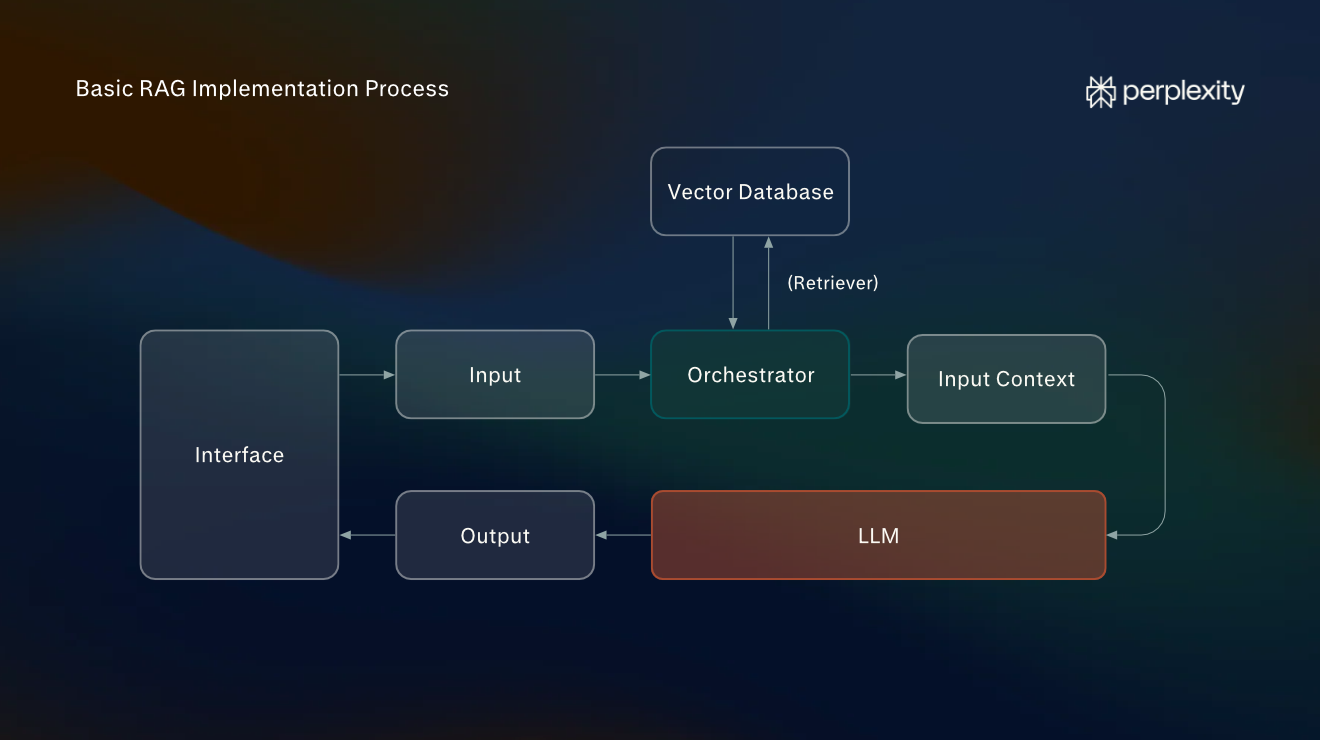
基础 RAG 实现流程:总体概览
基础 RAG 系统包含三个主要组件:编排器、信息源和 LLM。在典型的工作流中,用户输入提示词,编排器对其进行改写,以便在所有已连接的信息源中进行搜索。随后,检索到的信息会被添加到原始输入上下文中,并发送给 LLM 以生成回复。
在构建 RAG 实现时,你需要考虑以下步骤:
- 索引与嵌入:在这一阶段,你的文档会被转换为编排器可以搜索的信息源。最常见的做法之一是构建可搜索的向量索引。我们将使用 Perplexity 的专用模型将文档块转换为嵌入,然后将这些嵌入存储在流行的开源向量数据库 ChromaDB 中。
- 编排:编排器是位于外部信息源(在本例中为向量数据库)与 LLM 之间的应用程序。我们将编写一个简单的 Python 脚本作为编排器。
- 检索与生成:当用户通过聊天界面提出问题时,编排器会接收问题、执行向量搜索,并将扩展后的输入传给 LLM。我们不会构建专门的前端,而是通过命令行与 Python 编排器交互。
最佳实践:怎样才算有效的 RAG 实现?
RAG 架构有多种类型,不同的用例需要不同的方法。尽管如此,仍有一些最佳实践适用于所有情况,可确保系统准确、经济高效、可扩展且易于维护。
以下最佳实践适用于所有类型的 RAG 实现:
- 确保摄取管道干净:在建立索引之前,源数据应尽可能干净。你还应选择适合内容的嵌入模型。
- 使用混合搜索:最佳检索方法因用例而异,无论是向量数据库搜索、基于 API 的网页搜索、知识图谱遍历、关键词搜索还是其他方法。选择合适的组合对于降低成本至关重要。
- 评估你的系统:实现完成后,你应从三个核心指标进行评估:准确性、相关性和延迟。准确性指事实是否正确;相关性指检索到的信息与用户查询的匹配程度;延迟指检索信息的速度。
- 安全处理信息:如果你的 RAG 系统使用私有的内部信息,请确保这些信息安全存储,并对系统界面的访问权限进行管理。切勿共享 API 密钥。
基础 RAG 实现:7 步教程
在本教程中,我们将构建一个命令行应用程序,用于回答关于单个文档的问题。我们将使用 Python、ChromaDB 和 Perplexity API。
我们的目标并不是构建可用于生产环境的 RAG 系统,而是提供一篇适合初学者的教程,说明基础 RAG 架构在实践中是如何运作的。
第 1 步:安装软件
请确保你的计算机上已安装以下软件,并且你拥有 Perplexity API 账户:
- Python:我们将使用这种编程语言构建编排器,由它协调嵌入模型、ChromaDB 和 Perplexity 之间的数据流。
- Visual Studio:我们将使用 Visual Studio 作为代码编辑器。安装完成后,打开扩展面板并下载 Python 扩展。
- Perplexity API 账户:Perplexity 将同时提供嵌入模型(用于将数据转换为向量嵌入)和处理扩展后提示词的 LLM。你无需付费账户即可完成本教程,不过会消耗少量积分。
第 2 步:创建项目文件夹
首先创建一个名为 rag-project 的文件夹,然后在 VS Code 中选择文件 > 打开文件夹来打开它。接着通过终端 > 新建终端打开集成终端。
输入以下命令,创建 Python 虚拟环境:
py -3.12 -m venv .venv现在你需要安装四个 Python 库:perplexityai、chromadb、python-dotenv 和 numpy。Perplexity SDK 让你可以通过 API 连接 Perplexity 的模型。ChromaDB 用于构建向量数据库,并在本地运行。Python-dotenv 从本地文件安全地加载你的 API 密钥,而 NumPy 则在摄取过程中使用。
使用以下命令安装这些库:
.\.venv\Scripts\python.exe -m pip install perplexityai chromadb python-dotenv numpy第 3 步:设置文件
将以下文件添加到 rag-project(项目根目录)中,方法是在资源管理器侧边栏中选择新建文件…:
- index.py:用于为文档建立索引的应用程序。你可以重新运行它来添加更多文本。
- rag.py:充当编排器的 Python 应用程序。
- document.txt:包含你要转换为向量数据库的文档内容。
- .env:用于存放你的 Perplexity API 密钥。
在 .env 中输入以下内容:
PERPLEXITY_API_KEY=your_api_key_here将 your_api_key_here 替换为你的实际密钥。为此,你需要前往 Perplexity API 控制台的主页仪表板,并选择创建 API 密钥。请妥善保管此 API 密钥,切勿泄露。
我们将使用两个模型:Perplexity 的 pplx-embed-v1-0.6b,用于在上传到 ChromaDB 之前对文档进行嵌入;以及 GPT-5.6-Luna(通过 Perplexity 的 API 访问),用于处理检索到的信息。
在 document.txt 中添加你的 RAG 管道要检索的文本。如果手头没有合适的文档,可以使用古腾堡计划(Project Gutenberg)中威廉·布莱克的《天真与经验之歌》来完成本教程。这是一部篇幅简短、通俗易懂的公有领域作品。
第 4 步:编写索引程序
将下面的代码复制并粘贴到 index.py 中。每个小标题都会简要说明其后代码段的作用。该程序将使用 Perplexity 的嵌入模型 pplx-embed-v1-0.6b 和 NumPy 库,把源材料转换为向量嵌入,并存储到 ChromaDB 数据库中。
该程序的作用如下:
- 打开 document.txt。
- 将文本拆分为相互重叠的文本块。
- 将这些文本块发送到 Perplexity 的 pplx-embed-v1-0.6b 嵌入模型。
- 使用 NumPy(一个提供计算函数的 Python 库)对返回的向量进行解码和归一化。
- 将向量和原始文本块存储到 ChromaDB 数据库中(你会看到它出现在项目目录中)。
该程序经过设置,不会在每次运行时都重新为文档建立索引。如果你在 document.txt 中添加了新信息,它只会对新增文本进行嵌入。
from pathlib import Path
from collections import defaultdict, deque
from hashlib import sha256
import base64
import numpy as np
import chromadb
from dotenv import load_dotenv
from perplexity import Perplexity
# 1. Connect to Perplexity and ChromaDB
load_dotenv()
ai = Perplexity()
db = chromadb.PersistentClient(path="./rag_database_perplexity")
collection = db.get_or_create_collection(
    name="documents",
    metadata={"hnsw:space": "cosine"}
)
# Convert Perplexity's encoded embeddings into numerical vectors
def decode_embedding(encoded):
    vector = np.frombuffer(base64.b64decode(encoded), dtype=np.int8).astype(np.float32)
    norm = np.linalg.norm(vector)
    if norm == 0:
        raise ValueError("Received a zero-length embedding vector.")
    return (vector / norm).tolist()
# 2. Read the document and split it into chunks
text = Path("document.txt").read_text(encoding="utf-8")
words = text.split()
chunk_size = 180
overlap = 30
step = chunk_size - overlap
chunks = [" ".join(words[i:i + chunk_size]) for i in range(0, len(words), step)]
if not chunks:
    raise ValueError("document.txt is empty.")
# 3. Retrieve the chunks already stored in ChromaDB
existing = collection.get(include=["documents"])
stored_chunks = defaultdict(deque)
existing_ids = set(existing["ids"])
for chunk_id, document in zip(existing["ids"], existing["documents"]):
    stored_chunks[document].append(chunk_id)
# 4. Identify unchanged and new chunks
new_chunks = []
new_ids = []
kept_ids = set()
unchanged = 0
for chunk in chunks:
    if stored_chunks[chunk]:
        chunk_id = stored_chunks[chunk].popleft()
        kept_ids.add(chunk_id)
        unchanged += 1
    else:
        chunk_hash = sha256(chunk.encode("utf-8")).hexdigest()
        chunk_id = f"chunk-{chunk_hash}"
        suffix = 1
        while chunk_id in existing_ids or chunk_id in kept_ids or chunk_id in new_ids:
            chunk_id = f"chunk-{chunk_hash}-{suffix}"
            suffix += 1
        new_chunks.append(chunk)
        new_ids.append(chunk_id)
        kept_ids.add(chunk_id)
# 5. Generate embeddings in batches of up to 100 chunks
batch_size = 100
for i in range(0, len(new_chunks), batch_size):
    batch_chunks = new_chunks[i:i + batch_size]
    batch_ids = new_ids[i:i + batch_size]
    embeddings = ai.embeddings.create(
        model="pplx-embed-v1-0.6b",
        input=batch_chunks,
        encoding_format="base64_int8"
    )
    vectors = [decode_embedding(item.embedding) for item in embeddings.data]
    # 6. Store each batch in ChromaDB
    collection.upsert(
        ids=batch_ids,
        documents=batch_chunks,
        embeddings=vectors
    )
    print(f"Indexed batch {(i // batch_size) + 1}")
# 7. Remove outdated chunks
old_ids = [chunk_id for chunk_id in existing["ids"] if chunk_id not in kept_ids]
if old_ids:
    collection.delete(ids=old_ids)
# 8. Display indexing results
print("Indexing complete!")
print("Unchanged chunks:", unchanged)
print("New or modified chunks:", len(new_chunks))
print("Removed chunks:", len(old_ids))
print("Total stored chunks:", collection.count())
第 5 步:编写 RAG 系统的编排器
将下面的代码复制并粘贴到 rag.py 中。这是一个完整但精简的 RAG 实现,使用了 Perplexity SDK 和 ChromaDB 的本地向量数据库功能。
运行该程序时,会执行以下操作:
- 连接到 Perplexity 和你新建的 ChromaDB 数据库。
- 检查数据库中是否包含已建立索引的文档。
- 接收用户提出的问题。
- 将问题发送到 Perplexity 的嵌入模型。
- 使用 NumPy 对生成的嵌入进行解码和归一化。
- 在 ChromaDB 中搜索最相似的三个文档块。
- 构建包含检索到的文本块和用户问题的提示词。
- 通过 Perplexity 的 Agent API 将提示词发送给 GPT-5.6 Luna。
- 显示答案,并等待下一个问题。
import base64
import numpy as np
import chromadb
from dotenv import load_dotenv
from perplexity import Perplexity
# 1. Connect to Perplexity and the existing ChromaDB database
load_dotenv()
ai = Perplexity()
db = chromadb.PersistentClient(path="./rag_database_perplexity")
collection = db.get_collection("documents")
# Convert Perplexity's encoded embeddings into numerical vectors
def decode_embedding(encoded):
    vector = np.frombuffer(base64.b64decode(encoded), dtype=np.int8).astype(np.float32)
    norm = np.linalg.norm(vector)
    if norm == 0:
        raise ValueError("Received a zero-length embedding vector.")
    return (vector / norm).tolist()
# 2. Check that the database contains indexed documents
count = collection.count()
if count == 0:
    raise ValueError("The database is empty. Run index.py first.")
print("Connected to existing ChromaDB database.")
print("Stored chunks:", count)
# 3. Accept questions from the user
while True:
    question = input("\nAsk a question (or type exit): ")
    if question.lower().strip() == "exit":
        break
    if not question.strip():
        continue
    # 4. Convert the question into a Perplexity embedding
    question_response = ai.embeddings.create(
        model="pplx-embed-v1-0.6b",
        input=[question],
        encoding_format="base64_int8"
    )
    question_vector = decode_embedding(question_response.data[0].embedding)
    # 5. Retrieve the most similar document chunks from ChromaDB
    results = collection.query(
        query_embeddings=[question_vector],
        n_results=min(3, count)
    )
    context = "\n\n".join(results["documents"][0])
    # 6. Construct a prompt and send it to the fixed LLM
    response = ai.responses.create(
        model="openai/gpt-5.6-luna",
        instructions=(
            "Answer using only the supplied document excerpts. "
            "Do not use external information. "
            "If the answer is not present, say you don't know."
        ),
        input=f"Document excerpts:\n{context}\n\nQuestion: {question}"
    )
    # 7. Display the answer
    print("\nAnswer:\n", response.output_text)
第 6 步:运行应用程序
在 VS Code 的 PowerShell 终端中,输入以下命令以嵌入 document.txt 中的内容:
.\.venv\Scripts\python.exe index.py如果文档已成功建立索引,你应该会看到类似下面的输出:
Indexing complete!
Unchanged chunks: 0
New or modified chunks: 58
Removed chunks: 0
Total stored chunks: 58
现在可以运行主编排器应用程序了。输入以下命令:
.\.venv\Scripts\python.exe rag.py如果运行成功,你将看到以下内容:
Connected to existing ChromaDB database.
Stored chunks: 58
Ask a question (or type exit):
现在,你可以提出问题,系统会从你创建的向量数据库中获取信息作答,例如:
Ask a question (or type exit): What animals does William Blake talk about?
Answer: The excerpts mention sheep, lambs, birds, beasts, wolves, tigers, and a lion.
第 7 步:了解你构建的系统
你构建的系统包含每种 RAG 架构都具备的两条核心管道:索引(或称“摄取”)管道,以及检索与生成管道。
现在,你的基础 RAG 实现能够完成以下所有工作:
- 向量存储:基于你的知识文件生成的嵌入会保存在本地环境的 ChromaDB 数据库中。
- 增量索引:未更改的文档块不会被重新嵌入,你可以随时更新文档。
- 语义检索:ChromaDB 根据向量相似度检索文本块(由编排器发起)。
- 基于检索内容生成答案:LLM 将检索到的段落作为上下文,并将其融入答案中。
- 索引与查询相互独立:你无需重新处理知识文件中的全部文本即可提问。
- 基于 API 的模型连接:所有答案均通过 Perplexity 使用 GPT-5.6 Luna 生成,而不是由在你本机上运行的模型生成。
后续步骤:如何进一步扩展此实现
本教程旨在构建一个简单直接的基础实现,涵盖了现代系统中的部分核心 RAG 架构组件。如果你想更进一步,可以通过多种方式在此基础上进行扩展。
以下是一些扩展实现范围的思路:
- 尝试使用 LangChain:LangChain 是最流行的开源编排框架之一,它提供了预构建组件,可用于构建能够运行复杂 RAG 管道的应用。
- 扩展搜索功能:将稠密向量搜索与 BM25 等词法(关键词)搜索结合使用。通过 Perplexity Search API 添加网页搜索,还能让答案基于最新数据。
- 添加重排序模型:集成一个重排序模型,根据初始提示词对检索到的段落进行排序,并选出最相关的段落,纳入提供给 LLM 的输入上下文中。
- 构建自适应 RAG 系统:在模块化 RAG 系统中,自适应 RAG 使用 LLM 或分类器(编排器中的一个组件)来决定采用哪种检索方法。构建自适应 RAG 系统是探索更复杂 RAG 实现的好方法。
虽然这些听起来可能很复杂,但请记住,Perplexity 等主流 AI 平台可以提供高级编程辅助。它们非常适合个人项目和实验,而且成本可以控制在相对较低的水平。
注意:本教程使用的是 GPT-5.6 Luna。由于模型的可用性可能会发生变化,你可能需要更新 API 调用。