.%20Same%20paths%20and%20fill;%20only%20the%20viewBox%20is%20cropped%20to%20the%20file's%20own%20clip%20rect%20so%20the%20bar%20sets%20the%20clear%20space.%20--%3e%3csvg%20width='480.615'%20height='97.3693'%20viewBox='97%2078%20480.615%2097.3693'%20fill='none'%20xmlns='http://www.w3.org/2000/svg'%3e%3cg%20clip-path='url(%23clip0_1709_25672)'%3e%3cpath%20d='M507.64%20157.772C497.197%20157.772%20490.907%20152.963%20490.907%20141.818V78H503.605V97.3565H530.187L547.394%20137.712L562.584%2097.3565H577.062L544.784%20175.369H530.424L540.63%20151.907L521.406%20108.501H503.605V139.941C503.605%20144.751%20505.741%20146.628%20510.725%20146.628H522.236V157.772H507.64Z'%20fill='%23121516'/%3e%3cpath%20d='M467.845%20157.772V97.3565H480.543V157.772H467.845ZM467.489%2091.139V78H480.899V91.139H467.489Z'%20fill='%23121516'/%3e%3cpath%20d='M404.356%20157.772L425.005%20126.215L405.899%2097.3566H421.089L433.549%20118.004L446.128%2097.3566H461.318L442.212%20126.215L462.861%20157.772H447.671L433.549%20134.779L419.546%20157.772H404.356Z'%20fill='%23121516'/%3e%3cpath%20d='M377.834%20159.532C359.915%20159.532%20348.285%20146.745%20348.285%20127.271C348.285%20108.501%20360.034%2095.5968%20377.122%2095.5968C394.329%2095.5968%20405.84%20107.445%20405.84%20125.16C405.84%20127.858%20405.722%20129.852%20405.366%20131.494H361.458C362.17%20142.874%20367.747%20148.974%20377.953%20148.974C385.31%20148.974%20390.176%20145.689%20391.956%20139.237H404.891C402.043%20151.907%20391.837%20159.532%20377.834%20159.532ZM361.458%20121.64H392.905C392.193%20111.317%20386.853%20106.155%20377.122%20106.155C367.984%20106.155%20362.288%20111.903%20361.458%20121.64Z'%20fill='%23121516'/%3e%3cpath%20d='M328.431%20157.772V78H341.128V157.772H328.431Z'%20fill='%23121516'/%3e%3cpath%20d='M263.88%20175.369V97.3565H276.578V103.457C280.375%2098.4123%20287.021%2095.5968%20294.853%2095.5968C311.111%2095.5968%20321.316%20107.915%20321.316%20127.506C321.316%20147.097%20311.111%20159.532%20294.853%20159.532C287.021%20159.532%20280.375%20156.717%20276.578%20151.672V175.369H263.88ZM292.123%20148.035C302.685%20148.035%20308.263%20140.997%20308.263%20127.506C308.263%20114.132%20302.685%20107.093%20292.123%20107.093C281.443%20107.093%20275.866%20114.132%20275.866%20127.506C275.866%20140.997%20281.443%20148.035%20292.123%20148.035Z'%20fill='%23121516'/%3e%3cpath%20d='M224.479%20157.772V97.3566H237.176V103.809C239.55%2099.7028%20244.178%2097.3566%20249.874%2097.3566H258.181V109.322H249.874C241.092%20109.322%20237.176%20113.546%20237.176%20122.931V157.772H224.479Z'%20fill='%23121516'/%3e%3cpath%20d='M188.82%20159.532C170.9%20159.532%20159.271%20146.745%20159.271%20127.271C159.271%20108.501%20171.019%2095.5968%20188.107%2095.5968C205.315%2095.5968%20216.825%20107.445%20216.825%20125.16C216.825%20127.858%20216.706%20129.852%20216.35%20131.494H172.443C173.155%20142.874%20178.733%20148.974%20188.938%20148.974C196.296%20148.974%20201.161%20145.689%20202.941%20139.237H215.876C213.028%20151.907%20202.823%20159.532%20188.82%20159.532ZM172.443%20121.64H203.891C203.179%20111.317%20197.838%20106.155%20188.107%20106.155C178.97%20106.155%20173.274%20111.903%20172.443%20121.64Z'%20fill='%23121516'/%3e%3cpath%20d='M97%20175.369V97.3565H109.698V103.457C113.495%2098.4123%20120.141%2095.5968%20127.973%2095.5968C144.231%2095.5968%20154.436%20107.915%20154.436%20127.506C154.436%20147.097%20144.231%20159.532%20127.973%20159.532C120.141%20159.532%20113.495%20156.717%20109.698%20151.672V175.369H97ZM125.244%20148.035C135.805%20148.035%20141.383%20140.997%20141.383%20127.506C141.383%20114.132%20135.805%20107.093%20125.244%20107.093C114.563%20107.093%20108.986%20114.132%20108.986%20127.506C108.986%20140.997%20114.563%20148.035%20125.244%20148.035Z'%20fill='%23121516'/%3e%3c/g%3e%3cdefs%3e%3cclipPath%20id='clip0_1709_25672'%3e%3crect%20width='480.615'%20height='97.3693'%20fill='white'%20transform='translate(97%2078)'/%3e%3c/clipPath%3e%3c/defs%3e%3c/svg%3e)
Shadow AI: Why employees go around IT, and what ends It
When employees use AI tools their company has not approved, they're showing where the official tools fall short.
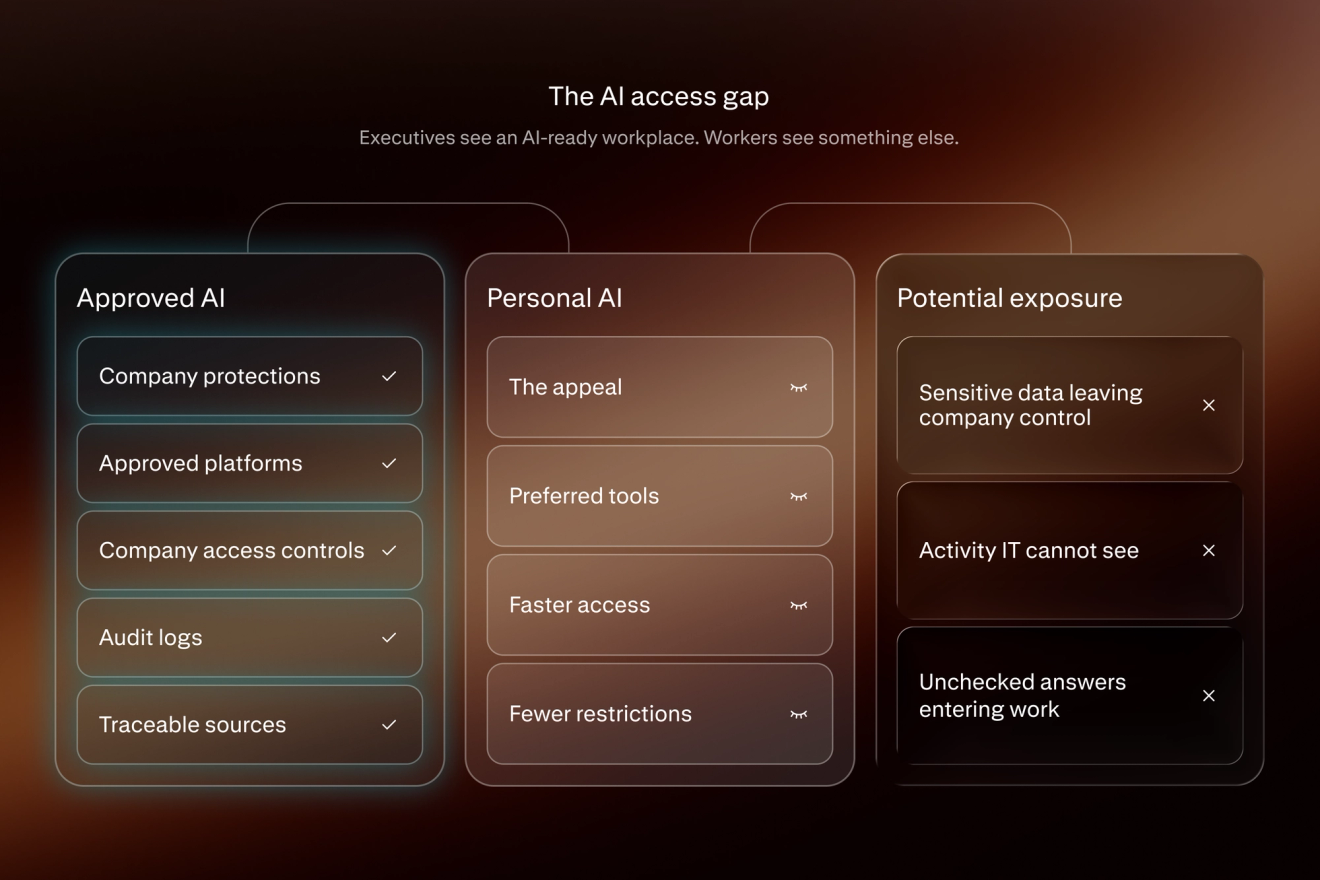
AI is now part of daily work for many employees, often multiple times a day. But the tools they reach for are not always the official ones IT gives them.
“Shadow AI” is the use of unsanctioned AI products at work, including:
- Personal chatbot
- AI agents
- AI assistant accounts
About half of employees say they have used AI in ways that break their organisation’s policies and guidelines, according to a KPMG survey of more than 48,000 people in 47 countries. Often, they paste sensitive company information into public AI tools.
The workaround has become a warning. A BCG survey of more than 10,000 employees, managers, and leaders found that nearly four in ten say their company is not supplying the right tools.
Employees go outside sanctioned tools then they are:
- Rationed
- Capped
- Worse than what they can get on their own
When the approved tools are good enough, most employees stop going around IT. The lesson: The demand for AI is strong, but shadow AI is often a sign of a supply problem.
What is shadow AI?
Shadow AI means employees use their own AI tools at work instead of the ones their organisation provides. It includes:
- Chatbots that answer questions
- Agents that carry out routine tasks
- Bots that record and transcribe meetings
- Assistants that tackle entire work routines
The tools can connect to work systems and apps. Some are stand-alone products, while others are AI features built into tools, devices, and platforms employees already have, like Copilot, Gemini, and Apple Intelligence.
In a survey of 2,000 employees commissioned by BlackFog, a security company, 58% of shadow AI users said they relied on free versions that often lack:
- Enterprise-grade security
- Data governance
- Privacy protections
mainly because they valued speed. Senior leaders reported using shadow AI almost twice as often as junior staff.
Employee use can be hard to detect. A Cloud Security Alliance survey found that:
- 82% of respondents said their organisations had unknown agents running on their systems
- 65% had experienced agent-related incidents, including data exposure, operational disruption, and financial losses
Shadow AI vs. shadow IT
Shadow IT came first. Aditya Patel, a cloud security specialist at AWS, calls shadow AI its “rebellious cousin.”
Shadow IT describes when workers go around corporate IT’s preferred technology products and use their own, sometimes deliberately and sometimes without knowing the rules. An employee signs into a personal Google, Dropbox, WhatsApp, or Trello account in a web browser on a work device, or emails a document to a personal address to finish at home.
What’s new with shadow AI is the scale and persistence. Some examples:
- Data pasted into a public tool can stay in a vendor’s systems indefinitely
- Agents and assistants keep running while an employee does something else, working away across applications, email, and platforms
Traditional security monitoring software was not built to see them. Closing a browser tab doesn’t stop the work, which is often invisible to everyone but the person who prompted it.
Shadow IT | Shadow AI | |
What it does | Stores and moves data | Reads, rewrites, and generates data |
Risks | Data sits somewhere IT doesn’t control | Data comes back changed, invented, or no longer secret |
How to detect | File transfers and app installs leave traces | A paste, a prompt, or an agent runs at machine speed through browsers and APIs, making detection more difficult |
Who's exposed | Mostly the person who used it | Teams and entire organisations, including customers who never chose the tool |
Examples of shadow AI at work
Shadow AI usually shows up in a few key situations:
Where it shows up | What it looks like | Real examples |
Racing to meet a deadline | Pasting real customer records, source code, or an internal transcript into a consumer chatbot. No one is acting maliciously. They are trying to get an answer faster. | A bank employee pastes customer names, Social Security numbers, and dates of birth into an unauthorised AI app; software engineers paste proprietary code and a confidential transcript into a chatbot. |
Meeting overload | One attendee turns on a personal notetaking bot and it secretly records and transcribes a meeting. The bot’s boss may not think about the sensitive information a transcript contains. | An AI notetaking company is sued for breach of privacy without prior consent; an online meeting platform concedes its controls cannot reach an unofficial bot a participant brings to the meeting. |
”Helpful” AI add-ons | A third-party AI extension connects to email, files, or calendars and can now access company data. No one owns the add-on or knows what it can read. | A security breach begins with an employee’s AI tool connected to a corporate Google Workspace account; a shadow AI audit finds 47 AI systems in use where leaders expected six or seven, most with no owner or ability to tell if they touched customer data. |
Hidden inside company systems | Scripts, workflows, and service accounts quietly interact with AI models. The custom agents never appear on any inventory, authenticating around the clock in patterns no human would produce. | A single scan of one platform surfaces seven unregistered agents no one knew were running and a credential with no identifiable owner. |
Client-facing and regulated work | An AI-generated document that was never checked gets submitted with invented facts. The employee and the employer, not the tool, bears the consequences. | More than 2,000 court cases worldwide involve AI-fabricated citations, some carrying significant fines. |
When a tool is blocked | The block moves the work rather than stopping it, shifting tasks to a personal phone, a VPN switched off, a snippet of pasted text into a chatbot instead of uploading an attachment, or a screenshot converted to text. | A developer at a bank turns off the company VPN and copies code back and forth into a chatbot; paste-and-screenshot methods bypass file-based controls. |
When the approved tool hits a usage cap or falls short | A tool is officially licensed but a budget cap hits during the month, or the sanctioned version doesn’t work well. People pay for the consumer tool themselves. | Engineers exhaust a monthly cap in days; employers throttle AI use because of the high cost. |
Why employees use unsanctioned AI
Employees have many reasons for using unsanctioned IT.
- Some face pressure to use AI, including poor performance reviews or job loss, while the tools their employer supply work less well than the ones they use at home.
- They reach for the better one to get the job done properly.
- Others find the approved tool too slow to arrive, too complex, too inflexible, or too often wrong.
Heavy AI use can become expensive, which has led a number of well-known companies to cap “tokenmaxxing” users. In June 2026, Uber capped employee spending at $1,500 per month for each agentic coding tool after spending its annual AI budget in four months.
Rationing pushes some employees to pay for the consumer version themselves rather than face a “tokenpocalypse.” Some of the same companies that tell employees to use AI are also gate-keeping access to it.
Employees work around the limits.
- They paste company data into a public chatbot to draft a report.
- They use an AI personal assistant or coding tool to speed up routine tasks.
Some researchers describe this as “shadow user innovation.” Many employees never realise they’re violating a company policy. And among employees who used AI against the rules, only about half are caught, according to a PagerDuty survey.
What can go wrong with shadow AI
The risks fall into at least five groups:
1. Security breaches: An unapproved tool can give attackers a route into internal systems. Vercel, a web infrastructure provider, disclosed in April 2026 that sophisticated hackers breached its systems after an employee connected a third-party app from Context.ai to an enterprise Google account. The attackers made off with customer credentials, and stolen data was later offered for $2 million.
2. Intellectual property leaks: Proprietary data can exit company-controlled servers with a single paste into a chatbot. In March 2023, Samsung employees pasted source code and confidential internal transcripts into ChatGPT. The fear was that other users could have accessed the data. Samsung banned generative AI tools weeks later.
3. Regulatory impacts: A breach or an AI-invented fact can bring regulatory scrutiny, fines, and reputational damage. CB Financial Services, the parent of Community Bank, filed a Form 8-K in May 2026 with the Securities and Exchange Commission that disclosed an internal incident involving sensitive customer information using an unauthorised AI application. It was the first known 8-K filed in response to shadow AI use.
4. Legal complications: Pasting confidential information into a consumer chatbot can jeopardize a company’s trade secret protections. In an April 2026 decision, a federal judge in California dismissed a trade-secret claim “with prejudice” because the plaintiff had developed the material with ChatGPT and had not taken reasonable steps to keep it confidential. In a separate ruling, a court found that a defendant’s personal AI chat logs were not protected by attorney-client privilege or the work-product doctrine, making them discoverable in court.
5. Privacy: A meeting bot can record people without their permission or knowledge. A case in U.S. District Court against Otter.ai asks whether an automatic notetaker can record participants without the consent of all parties, and whether Otter can use conversations to train its model. Separately in 2024, researcher Alex Bilzerian told The Washington Post that he walked away from a deal after Otter emailed him the full transcript of a meeting he had already left, in which investors discussed strategic missteps and manipulated metrics.
Why bans fail
Companies have banned specific AI products and then reversed course.
- Samsung banned generative AI tools in 2023 and adopted ChatGPT, Gemini, and Claude companywide in 2026.
- Citigroup restricted ChatGPT in 2023 and rolled out its own AI tools to employees in 2024.
- After Italy blocked ChatGPT in 2023, output from Italian software developers fell by about half for two days and then recovered, while downloads of tools to bypass the block rose sharply, two economists found in a working paper.
- On Reddit, a network security professional wrote that after the company where he worked blocked ChatGPT, employees switched to the AI features inside approved company apps, which could not be turned off.
Bans often shift work to other places rather than stopping unauthorised AI use.
- In the KPMG survey, 67% of employees that ban public AI tools said they had put sensitive or copyrighted material into a tool, compared with 33% at organisations with no formal policy.
- Aggressive blocking pushes AI use onto personal devices and limits what the organization can see, research finds.
- A screen capture or photo of a webpage can defeat file-based controls.
How to end shadow AI workarounds
Companies with less shadow AI make the sanctioned path the easier one. Effective AI usage policies, ongoing AI literacy training, technical safeguards, and human accountability are the baseline. Four practices go further:
- Pick the tool employees would have chosen anyway. A survey from Recon Analytics found 68% of employees given only Copilot named it as their primary AI tool, compared with 8% when given three major tools. Moderna compared its own assistant with Copilot and ChatGPT Enterprise in user testing, then picked the one that employees rated highest.
- Supply the alternative before restricting the workaround. An Australian study of critical infrastructure practitioners found several organisations blocked public AI tools only after they began offering the sanctioned option, an approach the authors called “substitution-first.” “If you don’t give them the tools, they’ll find a way to get the tools,” one participant said. Netskope Threat Labs, the research arm of the cloud security provider, reported that personal AI account use at its financial services customers fell from 76% to 36% with official solutions while approved use rose from 33% to 79%.
- Provide a range of tailored training options. In the Australian government’s Copilot trial, three quarters of people who received three or more forms of training were confident using the tool, 28 percentage points above those who received one form of training. A BCG survey found that 18% of employees who received no training were regular AI users, compared with 82% of those who received five to ten hours of instruction, in-person sessions, and coaching. Only 36% of employees said they were satisfied with their AI training, calling it too short or superficial.
- Start with the people who already want a tool. Peter Tucker, at the time an IT director at IK Partners, a 250-person private equity firm, used a demand-led strategy with zero mandate to reach 190 ChatGPT Enterprise users. He began with 20 volunteers, who became internal advocates when they saw how it could save them time. He built connectors with the tools people already worked with, including Exchange, Egnyte, and Notion. And he ran voluntary sessions with a data scientist that 120 of the firm’s 250 employees attended. BBVA went from 3,300 licenses to 11,000 with training for 250 leaders, including its CEO, framing the company tool as a more secure alternative to shadow AI.
The bottom line
When employees go around the tools their company gives them, they show exactly where those tools fall short. Blocking them hides that information. The companies with the least shadow AI use supply a good tool, pick the one that employees would have chosen anyway, and treat whatever shadow use remains as a list of features still missing.
How Perplexity can help
Perplexity Enterprise gives companies a secure tool employees choose on the merits, with work-account sign-in that admins can enforce; role-based permissions so people see only what IT allows; audit logging across user inputs, agent steps, and answers; company information that is never used to train AI models; and links to its sources on every answer so anyone can check a fact before passing it to a client. And the Comet for Enterprise browser follows the security standards and controls a company already has in place.
FAQs
How can I tell if I'm using shadow AI without meaning to?
Check whether an AI tool is on the company’s approved list. Browser extensions, note-taking tools, and automatic AI features all count, and most people who break the policy never realize it.
What should I do if I pasted something sensitive into a personal AI tool?
Tell someone on the IT or security team the same day, and tell them specifically what was shared. Companies and courts have treated prompt, voluntary disclosure differently from concealment, and the practical damage usually depends on how quickly access can be revoked and credentials changed.
What if a coworker brings an AI notetaker into a meeting?
Ask before the conversation starts, because one participant’s choice records everyone. Recording consent rules vary by state and cover every person on a call, not just the host, so speak up early or ask that sensitive portions not be transcribed.
Does providing an approved AI tool make shadow AI go away?
No, and few reliable studies directly measure usage before and after an approved tool is launched. Effective sanctioned tools remove one of the biggest reasons to go outside, but a share of people will always keep using both, and that signal is worth paying attention to rather than punishing.
How can a manager tell a discipline problem from a tooling problem?
Look at what people reach for and why. If the workaround saves real time, it is revealing what the approved tool is missing. The most practical response is to fix the gap. Concealment usually signals fear of the consequences, not bad intent.