
Context compaction: what happens when your AI chat runs out of room, and what to do about it
Context compaction summarizes older messages when a long AI conversation approaches the context window limit, and knowing how it works helps you keep key details from getting lost.
What context compaction means
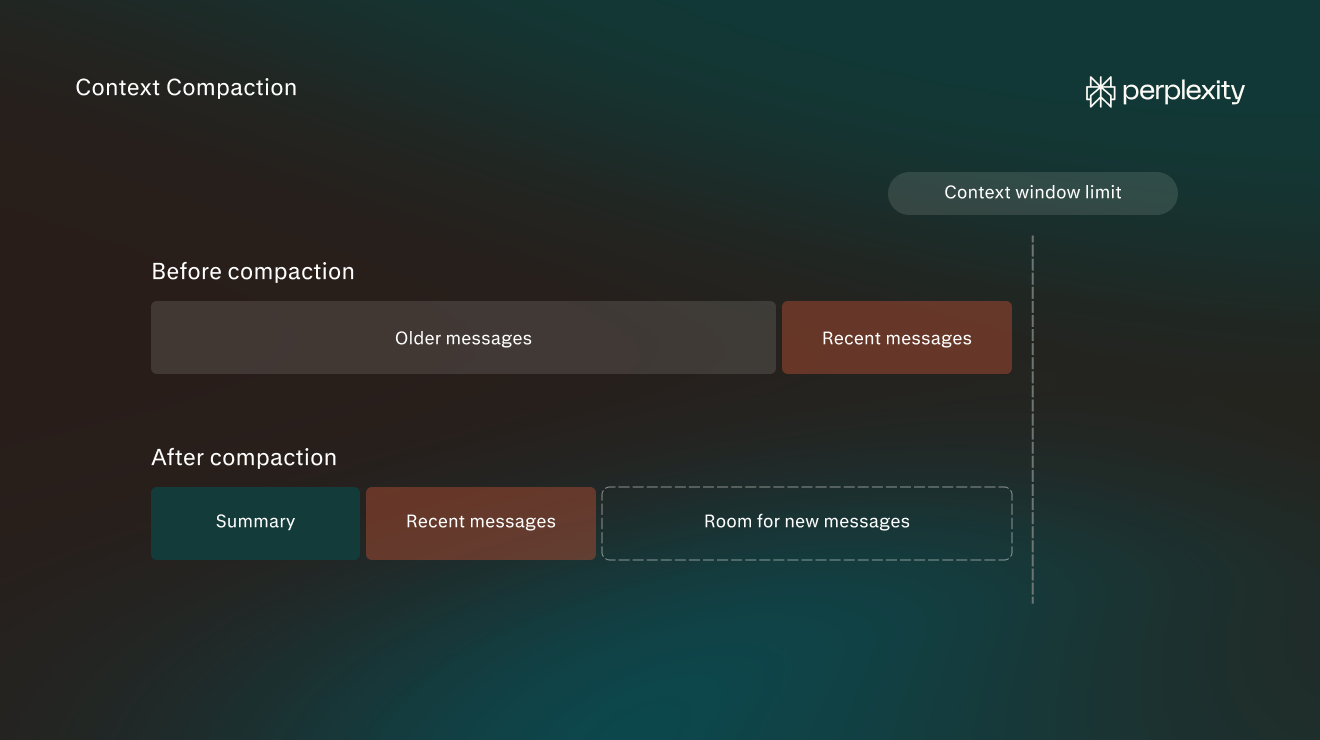
Context compaction is when an AI tool summarizes the older part of a long conversation, then sends the AI model that summary instead of the full text. Recent messages often stay word for word. The model then carries on from the summary and those recent messages.
Compaction is necessary because the model itself doesn't store the conversation. Each time someone sends a message, the AI tool passes the model everything it needs to respond: instructions, earlier messages, uploaded files, and search results. That material is the model's context.
A model can only take in so much context at one time. That limit is called the context window. It's measured in tokens, the small chunks of text a model reads. A token can be a word, part of a word, or a punctuation mark. In English, 1 token is about 4 characters of text.
Compaction does two jobs. The first is making room. Every message, pasted document, and web page in a conversation adds tokens. A long research session with several pasted reports could quickly pass the context window's limit. Compaction frees up space so the conversation can continue after that point.
The second job is to keep its answers fast and accurate. Each time the model replies, it reads the whole context again, from the first message to the latest one. So the longer the conversation, the more text it has to process for every reply. That takes more time and computing power.
A long context can also make answers less accurate, an effect called context rot. As the model works through more text, it may start to miss details from early in the conversation. A summary strips out much of that material, so compaction can help even before the context window is full.
How context compaction works
Context compaction happens in three stages. The tool notices the context is getting long, writes a summary, and hands the model the shorter version so the work can continue. Each AI tool handles these stages a little differently.
When compaction starts
Many AI tools compact automatically once the context reaches a set size, called a threshold. The threshold usually sits below the context window's limit. That leaves room for the summary itself and for the work that follows.
The exact point varies by tool. Tools measure it in one of three ways:
- By token count. Anthropic's Claude API, which developers use to build Claude into their own apps, starts compacting at 150,000 input tokens by default. That's roughly 600,000 characters of English text. Meanwhile, OpenAI's API lets developers set their own number. Its documentation example uses 200,000 tokens.
- By share of the context window. Dust, a platform companies use to build AI agents for their teams, requires compaction once a conversation has used 80% of its context window.
- By the number of exchanges. Google's Agent Development Kit, a toolkit for building AI agents, can compact after a set number of exchanges, such as every three. (An exchange is one message and the reply to it.)
Compaction often happens with little or no notice. The chat on screen usually looks the same, because only what gets sent to the model changes. Some apps show a brief status message while it runs. Other apps may give no sign at all.
What gets compacted
Some information is too important to compact. For example, tools like Perplexity’s Agent API won’t compact the original request, the agent’s standing instructions, or the skills that the agent already uploaded.
The agent needs to apply its instructions (such as which sources to use) at every step. Summarizing them might mean that the agent stops obeying them partway through a task. The original request is the agent's goal. Keeping it word for word protects details like a deadline or a required format, which a summary might drop.
How work continues after context compaction
After compaction, the agent works from the summary instead of the full history. However, that creates a risk. A summary reads like a wrap-up of the work so far. The AI might think it means the task is finished, and stop before it has done everything the request asked for.
To avoid this, tools that run long tasks often add information to keep the work moving. GitHub Copilot, an AI coding assistant, includes the current state of any plans or to-do lists alongside the summary, so the AI can see which steps are still open. Perplexity's Agent API gives the AI a direct instruction after compaction: "Continue working until the task is done." Some tools, including Perplexity's Agent API and Cursor's Composer model, also tell the AI how many times compaction has happened so far. That helps it plan the remaining work.
The problem with context compaction
Every compaction involves a choice about what to keep. That choice is harder than it sounds, because the details that matter most aren't always clear yet. A detail that seems minor early in a task might turn out to be essential later.
Exact details are the most likely to go missing, such as names, figures, or which sources have already been checked. Factory, a company that builds AI coding agents, tested three compaction methods: its own, plus the ones built into OpenAI's and Anthropic's developer tools. Every method struggled to keep a record of which files the agent had already worked on. Without that record, the agent might redo work it had already done.
The losses can build up over a long task. Each compaction summarizes material that may already be a summary. Researchers call the extreme version "context collapse": repeated rewrites shrink the context until it holds too little to be useful. Factory also found that the summaries became progressively less accurate every time they’re reproduced in the conversation.
In addition, summaries can change how the AI behaves, not just what it remembers. JetBrains Research found that AI agents working from summaries ran about 15% longer than agents using a simpler method. This might sound like a good thing, but the researchers suggest that in fact the summaries might hide signs that a task is already done. The agent then keeps working past the point where it should have stopped, which adds cost without improving results.
Context compaction vs. truncation, retrieval, and memory
Compaction is one of several ways AI tools work within the limits of the context window. For example, in a long research task, retrieval might bring in the relevant sources. Compaction might condense earlier steps as the context fills. Memory might then save key decisions for the next session.
Approach | What it does | Where it applies | Drawback |
Compaction | Summarizes older messages and keeps the summary in the context | Within one conversation or task | The summary might leave out details |
Truncation | Drops the oldest messages to make room | Within one conversation | Removes information with no record of what's gone |
Retrieval-augmented generation (RAG) | Stores material outside the context and pulls in only the relevant passages when needed | Any request that draws on documents, web pages, or past work | Can only use what its search finds |
Memory | Saves key details, such as preferences or past decisions, and loads them into later sessions | Across conversations | Keeps selected details, not the full conversation |
How to work with context compaction in long AI chats
Save standing rules as instructions, not messages
A rule set at the start of a long chat might not make it into the summary. Many AI apps let people save instructions at the project or workspace level instead. These instructions are usually applied to every query, so they don't depend on the chat history.
For instance, in Perplexity, you can set up new Projects for similar tasks, or move existing sessions into separate Projects. Instructions of up to 8,000 characters go in the Project’s settings. They can cover anything that should hold for the whole project, such as a preferred response format, spelling conventions, or a status file for Perplexity to keep updated.
Ask for a structured checkpoint summary
Compaction writes its own summary, which people usually can't see or check. Instead, try manually asking for a summary at key milestones, such as after a major decision or before a new phase of work. List the headings it should use, such as goal, decisions, and next step, so it's less likely to skip a type of detail. Then correct anything missing or wrong.
This doesn’t replace compaction, but it makes sure the AI has an accurate summary to work from when compaction takes place automatically. Compaction usually keeps recent messages word for word, so the corrected summary should stay intact, at least until the conversation moves well past it.
Example query: "Summarize our work so far under these headings: Goal, Decisions and reasons, Exact figures and sources, Options ruled out, Next step. Write 'none' under any heading with nothing to report."
Test what the AI still knows
After a long stretch of work, check what the AI can still recall before relying on its next answer. A vague or wrong answer suggests that detail didn't make it into the summary.
Example query: "Without looking anything up, what did we decide about the budget, and why?"
Restate key details during long conversations
There are sometimes signs that the AI is working from an inaccurate summary. For example,
it might ask for information it should already have, break a rule set earlier, or bring back an option that was ruled out. When that happens, restate the missing detail directly instead of pointing back to an earlier message. That earlier message may no longer be in the AI's context.
Example query: "Reminder of the rules for this task: use British spelling, cite every figure, and leave Vendor B out of the comparison because we ruled it out on price."
Put reference material in files, not pasted text
Text pasted into a chat becomes part of the conversation, so it can be summarized along with everything else. A long report or detailed style guide pasted early on might shrink to a few lines.
Files saved to a project or workspace usually work differently. The AI can look them up again when needed, much like the retrieval approach in the table above. How files are handled varies by app, so it's worth checking before relying on this.
Keep a running record outside the chat
Text pasted into a chat becomes part of the conversation, so compaction can summarize it like any other message. A 20-page report pasted early on might shrink to a few lines. Its exact figures could be lost.
Files saved to a project are stored outside the conversation, so compaction doesn't summarize them. The AI can look them up again whenever a question needs them. For instance, in Perplexity, files uploaded to a Project stay with that Project, ready for any search or task inside it.
Upload reference material, such as reports, style guides, or data, to the project at the start. Then refer to files by name instead of pasting their contents.
Example query: "Check the revenue figures in my draft against the Q3 report in this project's files."
Have the AI keep a running record
For long projects, keep the details that matter in a separate document: decisions, exact figures, sources already checked, and the current next step. When the AI gets one of these wrong, paste the relevant part back in or upload the document as a file.
The AI may be able to do this for you. For example, in a Perplexity Project, instructions can ask Computer to keep a status file updated as the work goes on. The file sits outside the conversation, so compaction doesn’t touch it. When the AI gets a detail wrong, point it back to the file.
Example Project instruction: “Keep a file called status in this Project. After each step, update it with decisions and the reasons for them, exact figures with sources, sources already reviewed, and the next step.”
How Perplexity approaches context compaction
Perplexity treats compaction as one part of a wider goal: keeping context small and accurate from start to finish.
Perplexity's agent limits what enters the context in the first place. When it reads a web page, it first runs an extraction pass that keeps only the relevant passages. With less text coming in, the context window can fill more slowly.
Brain, Perplexity's memory system for Computer, carries context from one task to the next. It remembers what the agent did: past projects, decisions, and sources. Computer then starts each new task with that context instead of from scratch.
Explore how Projects keep files, instructions, and memory together for long-running work.
Context compaction FAQ
Does context compaction delete chat history?
In most apps, no. The full conversation usually stays visible on screen. Only what gets sent to the AI model changes. Anthropic, for example, says Claude keeps the full chat history even after earlier parts have been summarized.
What does "context compacted" mean?
Some AI tools show a "Context compacted" message after they summarize the earlier part of a conversation. It means the AI is now working from that summary plus the most recent messages. Details from early in the conversation might need restating.
Can context compaction be turned off?
In most chat apps, compaction runs automatically and has no off switch. Developers have more choice. For example, compaction in the Claude API and OpenAI's API only runs when a developer turns it on.
Do bigger context windows make compaction unnecessary?
No. Long tasks can still fill a large context window. A longer context can also make answers less accurate, an effect called context rot [link to context rot post]. That's why some apps compact well before the limit. In the Claude app, Claude Sonnet 5 has a 1 million-token context window but compacts conversations at 500,000 tokens.