.%20Same%20paths%20and%20fill;%20only%20the%20viewBox%20is%20cropped%20to%20the%20file's%20own%20clip%20rect%20so%20the%20bar%20sets%20the%20clear%20space.%20--%3e%3csvg%20width='480.615'%20height='97.3693'%20viewBox='97%2078%20480.615%2097.3693'%20fill='none'%20xmlns='http://www.w3.org/2000/svg'%3e%3cg%20clip-path='url(%23clip0_1709_25672)'%3e%3cpath%20d='M507.64%20157.772C497.197%20157.772%20490.907%20152.963%20490.907%20141.818V78H503.605V97.3565H530.187L547.394%20137.712L562.584%2097.3565H577.062L544.784%20175.369H530.424L540.63%20151.907L521.406%20108.501H503.605V139.941C503.605%20144.751%20505.741%20146.628%20510.725%20146.628H522.236V157.772H507.64Z'%20fill='%23121516'/%3e%3cpath%20d='M467.845%20157.772V97.3565H480.543V157.772H467.845ZM467.489%2091.139V78H480.899V91.139H467.489Z'%20fill='%23121516'/%3e%3cpath%20d='M404.356%20157.772L425.005%20126.215L405.899%2097.3566H421.089L433.549%20118.004L446.128%2097.3566H461.318L442.212%20126.215L462.861%20157.772H447.671L433.549%20134.779L419.546%20157.772H404.356Z'%20fill='%23121516'/%3e%3cpath%20d='M377.834%20159.532C359.915%20159.532%20348.285%20146.745%20348.285%20127.271C348.285%20108.501%20360.034%2095.5968%20377.122%2095.5968C394.329%2095.5968%20405.84%20107.445%20405.84%20125.16C405.84%20127.858%20405.722%20129.852%20405.366%20131.494H361.458C362.17%20142.874%20367.747%20148.974%20377.953%20148.974C385.31%20148.974%20390.176%20145.689%20391.956%20139.237H404.891C402.043%20151.907%20391.837%20159.532%20377.834%20159.532ZM361.458%20121.64H392.905C392.193%20111.317%20386.853%20106.155%20377.122%20106.155C367.984%20106.155%20362.288%20111.903%20361.458%20121.64Z'%20fill='%23121516'/%3e%3cpath%20d='M328.431%20157.772V78H341.128V157.772H328.431Z'%20fill='%23121516'/%3e%3cpath%20d='M263.88%20175.369V97.3565H276.578V103.457C280.375%2098.4123%20287.021%2095.5968%20294.853%2095.5968C311.111%2095.5968%20321.316%20107.915%20321.316%20127.506C321.316%20147.097%20311.111%20159.532%20294.853%20159.532C287.021%20159.532%20280.375%20156.717%20276.578%20151.672V175.369H263.88ZM292.123%20148.035C302.685%20148.035%20308.263%20140.997%20308.263%20127.506C308.263%20114.132%20302.685%20107.093%20292.123%20107.093C281.443%20107.093%20275.866%20114.132%20275.866%20127.506C275.866%20140.997%20281.443%20148.035%20292.123%20148.035Z'%20fill='%23121516'/%3e%3cpath%20d='M224.479%20157.772V97.3566H237.176V103.809C239.55%2099.7028%20244.178%2097.3566%20249.874%2097.3566H258.181V109.322H249.874C241.092%20109.322%20237.176%20113.546%20237.176%20122.931V157.772H224.479Z'%20fill='%23121516'/%3e%3cpath%20d='M188.82%20159.532C170.9%20159.532%20159.271%20146.745%20159.271%20127.271C159.271%20108.501%20171.019%2095.5968%20188.107%2095.5968C205.315%2095.5968%20216.825%20107.445%20216.825%20125.16C216.825%20127.858%20216.706%20129.852%20216.35%20131.494H172.443C173.155%20142.874%20178.733%20148.974%20188.938%20148.974C196.296%20148.974%20201.161%20145.689%20202.941%20139.237H215.876C213.028%20151.907%20202.823%20159.532%20188.82%20159.532ZM172.443%20121.64H203.891C203.179%20111.317%20197.838%20106.155%20188.107%20106.155C178.97%20106.155%20173.274%20111.903%20172.443%20121.64Z'%20fill='%23121516'/%3e%3cpath%20d='M97%20175.369V97.3565H109.698V103.457C113.495%2098.4123%20120.141%2095.5968%20127.973%2095.5968C144.231%2095.5968%20154.436%20107.915%20154.436%20127.506C154.436%20147.097%20144.231%20159.532%20127.973%20159.532C120.141%20159.532%20113.495%20156.717%20109.698%20151.672V175.369H97ZM125.244%20148.035C135.805%20148.035%20141.383%20140.997%20141.383%20127.506C141.383%20114.132%20135.805%20107.093%20125.244%20107.093C114.563%20107.093%20108.986%20114.132%20108.986%20127.506C108.986%20140.997%20114.563%20148.035%20125.244%20148.035Z'%20fill='%23121516'/%3e%3c/g%3e%3cdefs%3e%3cclipPath%20id='clip0_1709_25672'%3e%3crect%20width='480.615'%20height='97.3693'%20fill='white'%20transform='translate(97%2078)'/%3e%3c/clipPath%3e%3c/defs%3e%3c/svg%3e)
基本 RAG 實作:逐步教學
這份適合初學者的教學會說明基本 RAG 實作的運作方式、介紹最佳做法,並逐步帶你使用 Python、ChromaDB 以及 Perplexity 的嵌入模型和語言模型,建置可實際運作的命令列 RAG 系統。
RAG 是現代 LLM 基礎架構中不可或缺的一環。RAG 讓 AI 模型能夠存取外部資料,有助於解決幻覺與訓練資料不完整等問題。這也代表企業能運用內含敏感或專有資訊的內部知識庫。
RAG 的實作可能非常複雜,但基本的 RAG 系統其實出乎意料地容易建置。對初學者來說,建立一個簡單的架構有助於了解 RAG 在實際環境中的運作方式,也能作為進一步實驗的跳板。
本文將說明基本 RAG 實作的架構、介紹最佳做法,接著使用 Python、ChromaDB 以及兩個分別用於嵌入與答案生成的 Perplexity 模型,建置一個可實際運作的系統。
基本 RAG 實作流程:概覽
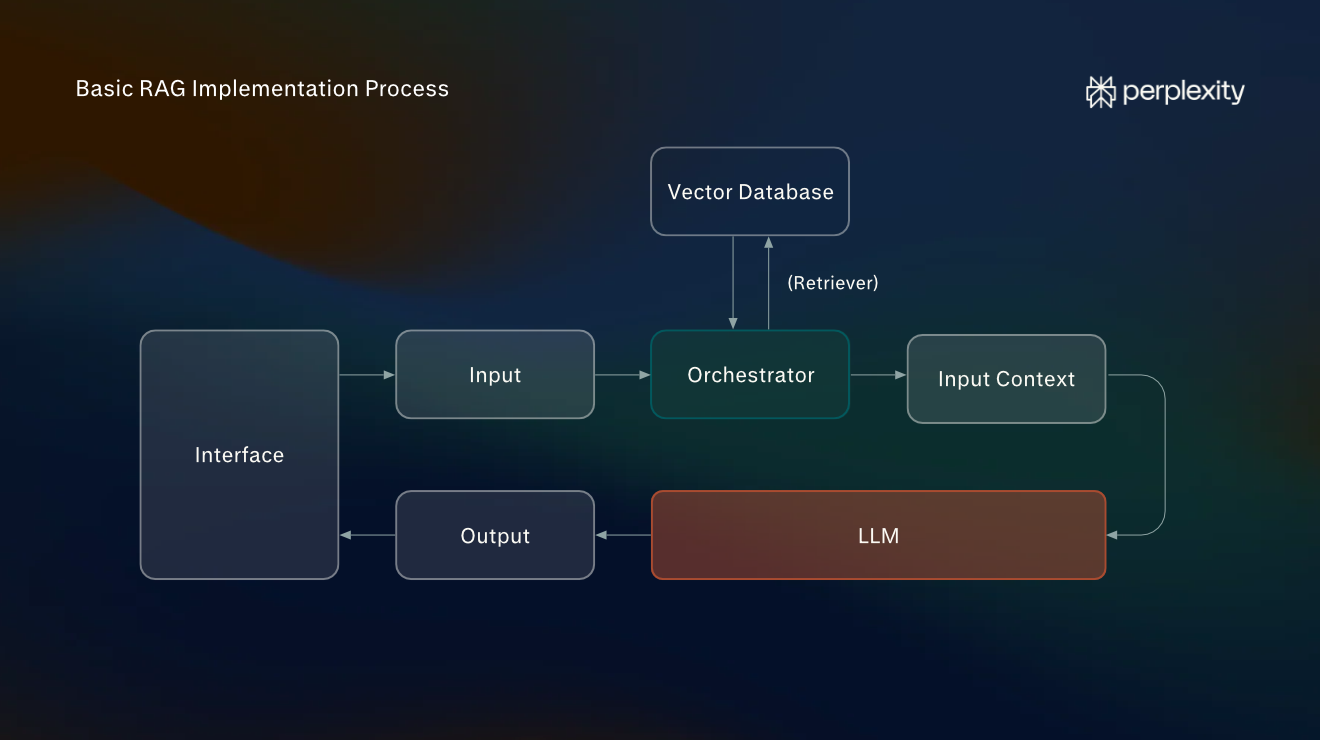
基本的 RAG 系統包含三大元件:協調器、資訊來源和 LLM。在典型的工作流程中,使用者輸入提示詞後,協調器會修改提示詞,以搜尋所有已連接的資訊來源。接著,擷取到的資訊會加入原始輸入上下文,再傳送給 LLM 以生成回覆。
建置 RAG 實作時,你需要考量下列步驟:
- 索引與嵌入:在這個階段,你的文件會轉換為協調器可搜尋的資訊來源。最常見的做法之一是建立可搜尋的向量索引。我們將使用 Perplexity 的專用模型,將文件區塊轉換為嵌入向量,再透過熱門的開源向量資料庫 ChromaDB 儲存這些嵌入向量。
- 協調:這是位於外部資訊來源(在本例中為向量資料庫)與 LLM 之間的應用程式。我們將建立一個簡單的 Python 指令碼來擔任協調器。
- 擷取與生成:當使用者透過聊天介面提出問題時,協調器會接收問題、執行向量搜尋,並將擴充後的輸入傳送給 LLM。我們不會另外建置專用前端,而是透過命令列輸入提示詞,與 Python 協調器溝通。
最佳做法:怎樣才是有效的 RAG 實作?
RAG 架構有多種類型,不同的使用情境需要不同的做法。儘管如此,仍有許多最佳做法適用於所有情況,能確保系統準確、具成本效益、可擴充且易於維護。
下列最佳做法適用於所有類型的 RAG 實作:
- 確保資料匯入管線乾淨:建立索引前,來源資料應盡可能乾淨。你也應該使用適合內容的嵌入模型。
- 使用混合搜尋:最佳的擷取方法會因使用情境而異,無論是向量資料庫搜尋、透過 API 進行的網路搜尋、知識圖譜遍歷、關鍵字搜尋或其他方法皆然。選擇合適的組合,對於降低成本十分重要。
- 評估你的系統:實作完成後,你應從三個核心指標進行評估:準確度、相關性和延遲。準確度是指事實是否正確;相關性是指擷取的資訊與使用者查詢的契合程度;延遲則是指擷取資訊的速度。
- 安全處理資訊:如果你的 RAG 系統會使用內部私人資訊,請確保資訊安全儲存,並妥善管理系統介面的存取權限。切勿分享 API 金鑰。
基本 RAG 實作:7 步驟教學
在本教學中,我們將建置一個命令列應用程式,針對單一文件回答問題。我們會使用 Python、ChromaDB 和 Perplexity API。
本教學的目的並非建置可用於正式環境的 RAG 系統,而是提供適合初學者的教學,說明基礎 RAG 架構實際上如何運作。
步驟 1:安裝軟體
請確認電腦上已安裝下列項目,並擁有 Perplexity API 帳戶:
- Python:這是我們用來建置協調器的程式語言,協調器負責協調嵌入模型、ChromaDB 與 Perplexity 之間的資料流。
- Visual Studio:我們將使用 Visual Studio 作為程式碼編輯器。安裝完成後,開啟延伸模組面板並下載 Python 延伸模組。
- Perplexity API 帳戶:Perplexity 將同時提供嵌入模型(將資料轉換為向量嵌入)以及處理擴充提示詞的 LLM。你不需要付費帳戶,但會消耗少量點數。
步驟 2:建立專案資料夾
首先,建立名為 rag-project 的資料夾,並選取檔案 > 開啟資料夾,在 VS Code 中開啟此資料夾。接著透過終端機 > 新增終端機開啟整合式終端機。
輸入下列內容以建立 Python 虛擬環境:
py -3.12 -m venv .venv現在你需要安裝四個 Python 程式庫:perplexityai、chromadb、python-dotenv 和 numpy。Perplexity SDK 可讓你透過 API 連線至 Perplexity 的模型。ChromaDB 會建置向量資料庫並在本機執行。Python-dotenv 會從本機檔案安全地載入你的 API 金鑰,而資料匯入過程則需要用到 NumPy。
使用下列指令安裝這些程式庫:
.\.venv\Scripts\python.exe -m pip install perplexityai chromadb python-dotenv numpy步驟 3:設定檔案
將下列檔案新增至 rag-project(專案根目錄),方法是在檔案總管側邊欄中選取新增檔案…:
- index.py:這是用來為文件建立索引的應用程式。你可以重新執行它來加入更多文字。
- rag.py:這是擔任協調器的 Python 應用程式。
- document.txt:這個檔案將包含你要轉換為向量資料庫的文件內容。
- .env:這是存放 Perplexity API 金鑰的地方。
在 .env 中輸入下列內容:
PERPLEXITY_API_KEY=your_api_key_here將 your_api_key_here 替換為你實際的金鑰。為此,你需要前往 Perplexity API Console 首頁儀表板,並選取建立 API 金鑰。請妥善保管此 API 金鑰,切勿外流。
我們將使用兩個模型:Perplexity 的 pplx-embed-v1-0.6b,用於在上傳至 ChromaDB 之前嵌入文件內容;以及 GPT-5.6-Luna(透過 Perplexity 的 API 存取),用於處理擷取到的資訊。
在 document.txt 中,加入 RAG 管線要擷取的文字。如果手邊沒有現成的文件,可以在本教學中使用古騰堡計畫(Project Gutenberg)上 William Blake 的《天真與經驗之歌》(Songs of Innocence and of Experience)。這是一部篇幅短、易於理解且屬於公共領域的作品。
步驟 4:撰寫索引程式
將下方程式碼複製並貼到 index.py 中。每個小標題都會簡要說明接下來那段程式碼的作用。這個程式會使用 Perplexity 的嵌入模型 pplx-embed-v1-0.6b 與 NumPy 程式庫,將你的來源資料轉換為向量嵌入,並儲存至 ChromaDB 資料庫。
這個程式的作用如下:
- 開啟 document.txt。
- 將文字分割成彼此重疊的區塊。
- 將這些區塊傳送至 Perplexity 的 pplx-embed-v1-0.6b 嵌入模型。
- 使用 NumPy(一個提供運算函式的 Python 程式庫)解碼並正規化傳回的向量。
- 將向量與原始區塊儲存至 ChromaDB 資料庫(你會看到它出現在專案目錄中)。
程式經過設定,不會在每次執行時重新為文件建立索引。如果你在 document.txt 中新增資訊,程式只會嵌入新的文字。
from pathlib import Path
from collections import defaultdict, deque
from hashlib import sha256
import base64
import numpy as np
import chromadb
from dotenv import load_dotenv
from perplexity import Perplexity
# 1. Connect to Perplexity and ChromaDB
load_dotenv()
ai = Perplexity()
db = chromadb.PersistentClient(path="./rag_database_perplexity")
collection = db.get_or_create_collection(
    name="documents",
    metadata={"hnsw:space": "cosine"}
)
# Convert Perplexity's encoded embeddings into numerical vectors
def decode_embedding(encoded):
    vector = np.frombuffer(base64.b64decode(encoded), dtype=np.int8).astype(np.float32)
    norm = np.linalg.norm(vector)
    if norm == 0:
        raise ValueError("Received a zero-length embedding vector.")
    return (vector / norm).tolist()
# 2. Read the document and split it into chunks
text = Path("document.txt").read_text(encoding="utf-8")
words = text.split()
chunk_size = 180
overlap = 30
step = chunk_size - overlap
chunks = [" ".join(words[i:i + chunk_size]) for i in range(0, len(words), step)]
if not chunks:
    raise ValueError("document.txt is empty.")
# 3. Retrieve the chunks already stored in ChromaDB
existing = collection.get(include=["documents"])
stored_chunks = defaultdict(deque)
existing_ids = set(existing["ids"])
for chunk_id, document in zip(existing["ids"], existing["documents"]):
    stored_chunks[document].append(chunk_id)
# 4. Identify unchanged and new chunks
new_chunks = []
new_ids = []
kept_ids = set()
unchanged = 0
for chunk in chunks:
    if stored_chunks[chunk]:
        chunk_id = stored_chunks[chunk].popleft()
        kept_ids.add(chunk_id)
        unchanged += 1
    else:
        chunk_hash = sha256(chunk.encode("utf-8")).hexdigest()
        chunk_id = f"chunk-{chunk_hash}"
        suffix = 1
        while chunk_id in existing_ids or chunk_id in kept_ids or chunk_id in new_ids:
            chunk_id = f"chunk-{chunk_hash}-{suffix}"
            suffix += 1
        new_chunks.append(chunk)
        new_ids.append(chunk_id)
        kept_ids.add(chunk_id)
# 5. Generate embeddings in batches of up to 100 chunks
batch_size = 100
for i in range(0, len(new_chunks), batch_size):
    batch_chunks = new_chunks[i:i + batch_size]
    batch_ids = new_ids[i:i + batch_size]
    embeddings = ai.embeddings.create(
        model="pplx-embed-v1-0.6b",
        input=batch_chunks,
        encoding_format="base64_int8"
    )
    vectors = [decode_embedding(item.embedding) for item in embeddings.data]
    # 6. Store each batch in ChromaDB
    collection.upsert(
        ids=batch_ids,
        documents=batch_chunks,
        embeddings=vectors
    )
    print(f"Indexed batch {(i // batch_size) + 1}")
# 7. Remove outdated chunks
old_ids = [chunk_id for chunk_id in existing["ids"] if chunk_id not in kept_ids]
if old_ids:
    collection.delete(ids=old_ids)
# 8. Display indexing results
print("Indexing complete!")
print("Unchanged chunks:", unchanged)
print("New or modified chunks:", len(new_chunks))
print("Removed chunks:", len(old_ids))
print("Total stored chunks:", collection.count())
步驟 5:撰寫 RAG 系統的協調器
將下方程式碼複製並貼到 rag.py 中。這是一個完整但精簡的 RAG 實作,使用 Perplexity SDK 和 ChromaDB 的本機向量資料庫功能。
執行程式時會發生以下情況:
- 連線至 Perplexity 和你新建的 ChromaDB 資料庫。
- 檢查資料庫是否包含已建立索引的文件。
- 接收使用者提出的問題。
- 將問題傳送至 Perplexity 的嵌入模型。
- 使用 NumPy 解碼並正規化產生的嵌入向量。
- 在 ChromaDB 中搜尋最相似的三個文件區塊。
- 建構包含擷取區塊與使用者問題的提示詞。
- 透過 Perplexity 的 Agent API 將提示詞傳送至 GPT-5.6 Luna。
- 顯示答案並等待下一個問題。
import base64
import numpy as np
import chromadb
from dotenv import load_dotenv
from perplexity import Perplexity
# 1. Connect to Perplexity and the existing ChromaDB database
load_dotenv()
ai = Perplexity()
db = chromadb.PersistentClient(path="./rag_database_perplexity")
collection = db.get_collection("documents")
# Convert Perplexity's encoded embeddings into numerical vectors
def decode_embedding(encoded):
    vector = np.frombuffer(base64.b64decode(encoded), dtype=np.int8).astype(np.float32)
    norm = np.linalg.norm(vector)
    if norm == 0:
        raise ValueError("Received a zero-length embedding vector.")
    return (vector / norm).tolist()
# 2. Check that the database contains indexed documents
count = collection.count()
if count == 0:
    raise ValueError("The database is empty. Run index.py first.")
print("Connected to existing ChromaDB database.")
print("Stored chunks:", count)
# 3. Accept questions from the user
while True:
    question = input("\nAsk a question (or type exit): ")
    if question.lower().strip() == "exit":
        break
    if not question.strip():
        continue
    # 4. Convert the question into a Perplexity embedding
    question_response = ai.embeddings.create(
        model="pplx-embed-v1-0.6b",
        input=[question],
        encoding_format="base64_int8"
    )
    question_vector = decode_embedding(question_response.data[0].embedding)
    # 5. Retrieve the most similar document chunks from ChromaDB
    results = collection.query(
        query_embeddings=[question_vector],
        n_results=min(3, count)
    )
    context = "\n\n".join(results["documents"][0])
    # 6. Construct a prompt and send it to the fixed LLM
    response = ai.responses.create(
        model="openai/gpt-5.6-luna",
        instructions=(
            "Answer using only the supplied document excerpts. "
            "Do not use external information. "
            "If the answer is not present, say you don't know."
        ),
        input=f"Document excerpts:\n{context}\n\nQuestion: {question}"
    )
    # 7. Display the answer
    print("\nAnswer:\n", response.output_text)
步驟 6:執行應用程式
在 VS Code 的 PowerShell 終端機中輸入下列指令,嵌入 document.txt 中的內容:
.\.venv\Scripts\python.exe index.py如果文件已成功建立索引,你應該會看到類似以下的輸出:
Indexing complete!
Unchanged chunks: 0
New or modified chunks: 58
Removed chunks: 0
Total stored chunks: 58
現在可以執行主要的協調器應用程式了。輸入此指令:
.\.venv\Scripts\python.exe rag.py如果執行成功,你會看到以下內容:
Connected to existing ChromaDB database.
Stored chunks: 58
Ask a question (or type exit):
現在你可以提出問題,系統會從你建立的向量資料庫中擷取資訊來回答,例如:
Ask a question (or type exit): What animals does William Blake talk about?
Answer: The excerpts mention sheep, lambs, birds, beasts, wolves, tigers, and a lion.
步驟 7:了解你建置的系統
你建置的系統包含每個 RAG 架構都具備的兩條核心管線:索引(或稱「資料匯入」)管線,以及擷取與生成管線。
你的基本 RAG 實作現在能做到以下所有事項:
- 向量儲存:嵌入向量會根據你的知識檔案,儲存在本機環境的 ChromaDB 資料庫中。
- 增量索引:未變更的文件區塊不會重新嵌入,而且你可以隨時更新文件。
- 語意擷取:ChromaDB 會根據向量相似度擷取區塊(由協調器發起)。
- 以資料為依據的答案生成:LLM 會接收擷取到的段落作為上下文,並將其融入答案中。
- 索引與查詢各自獨立:你可以直接提問,不必重新處理知識檔案中的所有文字。
- 透過 API 連接模型:所有答案皆透過 Perplexity 使用 GPT-5.6 Luna 生成,而非使用在你電腦上執行的模型。
後續步驟:如何進一步擴充這個實作
本教學的目的是建置一個簡單易懂的基本實作,涵蓋現代系統中部分核心 RAG 架構元件。如果你想更進一步,有多種方式可以在此基礎上擴充。
以下是一些擴充實作範圍的構想:
- 試用 LangChain:LangChain 是最熱門的開源協調框架之一,內含預先建置的元件,可用於開發能執行複雜 RAG 管線的應用程式。
- 擴充搜尋功能:將密集向量搜尋與 BM25 等詞彙(關鍵字)搜尋結合。透過 Perplexity Search API 加入網路搜尋,也能讓答案以最新資料為依據。
- 加入重新排序模型:整合重新排序模型,依據初始提示詞為擷取到的段落排序,並選出最相關的段落,納入提供給 LLM 的輸入上下文中。
- 建置自適應 RAG 系統:自適應 RAG 會使用 LLM 或分類器(協調器中的元件),在模組化 RAG 系統中決定要使用哪種擷取方法。建置自適應 RAG 系統是探索更進階 RAG 實作的好方法。
雖然這些聽起來可能很複雜,但請記得,Perplexity 等主流 AI 平台能提供進階的程式設計協助。這些平台非常適合用於個人專案和實驗,而且成本可以控制在相對較低的水準。
注意:本教學使用 GPT-5.6 Luna。模型的可用性可能會變動,因此你可能需要更新 API 呼叫。